



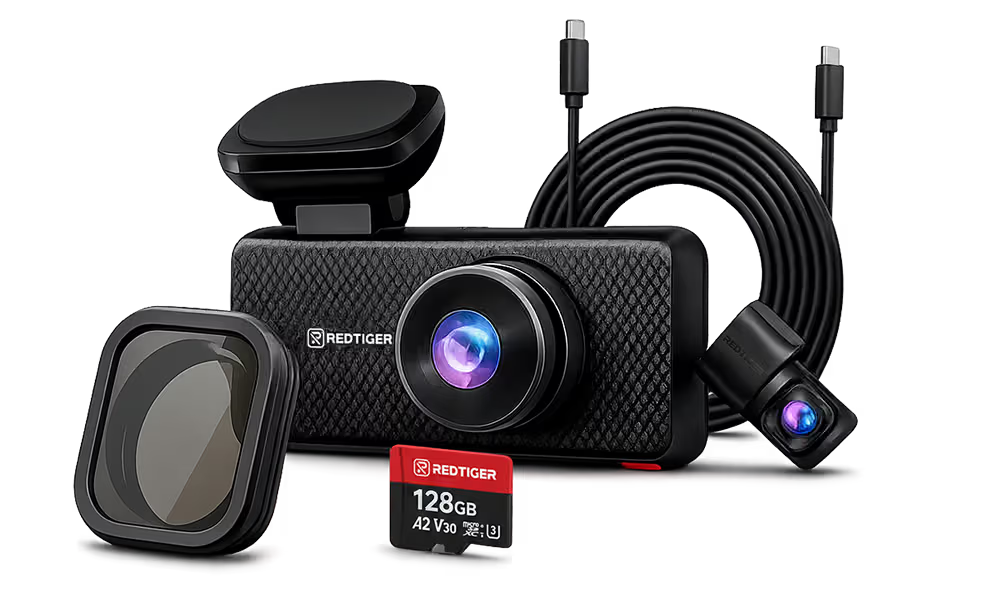




























Incident recording guide
Vehicle incident recording hardware, explained
A dash cam that records is not the same as one that keeps usable evidence. Four hardware checks decide whether the clip you need is sharp, protected, timestamped, and still playable after months of loop recording.

About this guide. REDTIGER publishes this page and makes every camera compared in it. We did not run hands-on tests for this guide. Specs and prices come from REDTIGER's US product pages and user manuals, in US dollars before tax and shipping. Prices change often, so confirm them before you buy. This version replaces our August 2026 guide and corrects several product details in it. Checked October 29, 2026.
The short answer: four checks
Look for a named 8MP-class sensor
Native 4K capture, not an upscaled file
The sensor has to capture the detail. A 4K file size alone doesn't prove it.
Look for adjustable sensitivity and locked event files
Impact detection that protects the clip
The impact clip has to leave the loop before the card fills up.
Look for built-in GPS, not just ADAS
Built-in GPS for time, speed, and place
The clip should show when and where it happened, and how fast you were going.
Look for a high-endurance U3 card or built-in storage
Storage built for nonstop writing
A worn card can keep recording while the clip you need fails to play.
Recording is not the same as keeping evidence
Prices and resolution labels overlap across the market. What separates the two groups is whether the footage survives and shows what you need.
A basic dash cam
Records video in a loop and overwrites the oldest footage when storage fills. If something happens, the useful clip depends on luck: whether the resolution resolves the plate, whether the clip was protected in time, and whether the card is still healthy.
Incident recording hardware
Is set up to keep the clip that matters. It captures real detail, moves impact clips out of the loop, records time, speed, and location from GPS, and writes to storage made for continuous recording.
The four hardware checks
Look for a named 8MP-class sensor
Native 4K capture, not an upscaled file
Why it matters
A camera can save a 3840×2160 file from a sensor that captured fewer pixels. The file is 4K; the detail is not. Native capture records real detail before compression, motion, and glare take their share, which gives you a better chance of reading a plate or a sign.
How to check
- Find the sensor model on the product page or spec table, not only the word 4K. Many listings, REDTIGER's included, define 4K by the size of the exported file.
- Check the sensor maker's numbers. Sony lists the IMX678 at about 8.40 million effective pixels, with 3840×2160 as its recommended recording size.
- Check each camera separately. A 4K front camera is often paired with a 1080p or 2.5K rear camera.
- Watch unedited night samples with motion, not a single still frame.
REDTIGER example. The F77 records 3840×2160 on both the front and rear cameras, with a Sony IMX678 in each. The F7NA uses the same IMX678 for its 4K front camera and pairs it with a 1080p rear camera.
View the F77Look for adjustable sensitivity and locked event files
Impact detection that protects the clip
Why it matters
Loop recording overwrites the oldest footage when storage fills. If the impact clip isn't moved out of the loop, a full card can erase it. Sensitivity matters too. Set it too high and potholes fill the protected folder; set it too low and a light hit in a parking lot may not trigger it.
How to check
- Read the manual's G-sensor or emergency recording section. You want triggered clips saved to a protected or event folder that loop recording skips.
- Check that sensitivity is adjustable. A beep or an icon on screen doesn't protect anything by itself.
- Look for a manual lock you can use without taking your hands off the wheel, such as a voice command.
- After installing, lock a clip by hand and confirm it shows up in the event folder in the app.
REDTIGER example. The F7NA locks emergency files automatically when it detects an impact, and REDTIGER says locked video won't be overwritten. The F77 offers Off, Low, Medium, and High G-sensor settings with emergency recording, plus touch and voice lock.
View the F7NALook for built-in GPS, not just ADAS
Built-in GPS for time, speed, and place
Why it matters
A clip is easier to use when it shows when and where it happened and how fast you were moving. GPS satellites carry atomic clocks, and a GPS receiver can keep the camera's clock in step with them. A clock set by hand can be wrong after a power loss or a daylight saving change.
How to check
- Look for built-in GPS or a GPS logger in the spec table. ADAS lane and collision warnings work from the camera image and don't provide location.
- Check that speed and location are recorded, and whether they appear on the video, in the file data, or both.
- Set the time zone and daylight saving option correctly. GPS supplies the time, but the camera still needs your zone.
- Play a clip in the maker's desktop player to confirm the map track and speed appear.
REDTIGER example. The F77 manual lists speed and GPS stamps and a clock that updates from GPS, and REDTIGER's free player shows the route on a map. The F7NA's built-in GPS logs speed and location.
View the F77Look for a high-endurance U3 card or built-in storage
Storage built for nonstop writing
Why it matters
A dash cam writes video every minute it runs, which wears flash memory faster than a phone or a camera does. A worn card may keep recording while some clips fail to play, and you often find out only when you need one.
How to check
- Use the card class the manual asks for. The SD Association's U3 and V30 marks mean a minimum sustained write speed for video.
- Choose a card sold as high endurance for dash cams or security cameras. Endurance ratings come from each card maker.
- Format the card in the camera as often as the manual suggests, and replace it if the camera reports card errors.
- With built-in storage, check the capacity, how you copy files off, and the warranty, since you can't swap it out.
REDTIGER example. The F77 stores video on built-in 128GB or 256GB eMMC, which REDTIGER says is more durable than SD cards; its SD slot is for copying backups. The F7NA and F17 Elite take microSD cards up to 512GB, and REDTIGER recommends high-endurance cards for both.
View the F77Where dash cams fall short
These gaps show up at every price. A camera that passes all four checks is a safer choice than a pricier one that misses two.
| Shortfall | What can go wrong | How to spot it |
|---|---|---|
| Upscaled 4K | The file is 3840×2160, but the detail isn't there, so distant plates blur sooner. | No named sensor, or a sensor under 8MP behind a 4K label. |
| Alert-only G-sensor | The impact clip stays in the loop and can be overwritten. | The manual mentions a beep or an icon but no protected or event folder. |
| No GPS | Speed, location, and time rest on your memory and a clock set by hand. | The spec table lists ADAS but no GPS or GPS logger. |
| Wrong memory card | Clips can fail to play, or recording can stop without warning. | The card has no U3 or V30 mark, or isn't sold for continuous recording. |
| Low-resolution rear camera | Rear-end and reversing incidents are recorded with less detail. | The rear camera is listed at 1080p while the headline says 4K. |
How three REDTIGER models measure up
US prices from REDTIGER's store on October 29, 2026, before tax and shipping. Swipe sideways on a phone to see every column.
| Spec |  REDTIGER F77 REDTIGER F77 |
 REDTIGER F7NA REDTIGER F7NA |
 REDTIGER F17 Elite REDTIGER F17 Elite |
|---|---|---|---|
| Cameras | 2: front and rear | 2: front and rear | 3: front, rear, and cabin |
| Front capture | 4K (3840×2160), Sony IMX678 | 4K (3840×2160) at 30 fps, Sony IMX678 | 4K, Sony IMX678 |
| Rear capture | 4K (3840×2160), Sony IMX678 | 1080p | 2.5K (1440p), Sony IMX675 |
| Impact protection | G-sensor with Off, Low, Medium, and High settings and emergency recording; touch and voice lock | Automatic impact lock; REDTIGER says locked files aren't overwritten | G-sensor detects impacts and saves video automatically |
| GPS | Built-in; speed and GPS stamps, clock updates from GPS | Built-in; logs speed and location | Built-in; records your route |
| Storage | Built-in 128GB or 256GB eMMC; SD slot for backup copies | microSD up to 512GB, sold separately; high-endurance U3 card recommended | microSD up to 512GB; 128GB card in the Basic bundle |
| Phone download | 5.8 GHz Wi-Fi, listed at 8 Mb/s | 5.8 GHz Wi-Fi 6, listed up to 20 Mb/s | 5.8 GHz Wi-Fi 6, listed up to 30 Mb/s |
| Parking mode | Needs the hardwire kit, which REDTIGER's store includes | Needs a hardwire kit; REDTIGER's pages disagree on whether the base set includes one. | Needs the hardwire kit, which the Basic bundle includes. NiteGuard night recording is on the front camera only. |
| Price checked | $219.99 | $159.99 | $259.99 |
| Price includes | Sale price (regular $399.99). 256GB and refurbished versions are priced separately. | Sale price for the base set (regular $189.99). No microSD card included. | Basic bundle with the hardwire kit and a 128GB card, listed against $349.99. |
Which one fits your driving
Native 4K front and rear, with no memory card to manage
REDTIGER F77
$219.99
Sale price (regular $399.99). 256GB and refurbished versions are priced separately.
Drivers who want the same detail behind the car as in front, and high-mileage or fleet drivers who would rather not maintain memory cards.
What it does well
- Native 4K on both cameras, so rear-end and reversing incidents get the same detail as the road ahead.
- Built-in 128GB or 256GB storage, so there's no card to buy, format, or lose.
- Hardwire kit included on REDTIGER's store, plus touch and voice commands.
Drawbacks to weigh
- Slowest phone download of the three, listed at 8 Mb/s.
- Built-in storage can't be swapped, and copying to an SD card is manual, so plan how you back up clips.
- No cabin camera.
Choose the F17 Elite if you also need the cabin recorded, or the F7NA if a 1080p rear camera is enough and faster downloads matter more.
View product
4K front detail and quick phone downloads at the lowest price here
REDTIGER F7NA
$159.99
Sale price for the base set (regular $189.99). No microSD card included.
Daily drivers who mostly need sharp footage of the road ahead and want to pull clips to a phone quickly.
What it does well
- The same Sony IMX678 4K front camera as the F77, recording at 30 fps.
- Automatic impact lock and built-in GPS that logs speed and location.
- Wi-Fi 6 listed up to 20 Mb/s, plus a touchscreen, voice control, and ADAS alerts.
Drawbacks to weigh
- The rear camera is 1080p, so rear plates are harder to read at a distance.
- The microSD card is sold separately, so budget for a high-endurance U3 card.
- REDTIGER's pages disagree on whether the base set includes the hardwire kit, so check the bundle before you buy.
Choose the F77 for native 4K on the rear camera too, or the F17 Elite for cabin coverage.
View product
Front, rear, and cabin in one system
REDTIGER F17 Elite
$259.99
Basic bundle with the hardwire kit and a 128GB card, listed against $349.99.
Rideshare, delivery, and work drivers who need a record of what happens inside the vehicle as well as on the road.
What it does well
- Three cameras: 4K front, 2.5K rear, and a 1080p cabin camera with full-color night video.
- Fastest phone download of the three, listed up to 30 Mb/s.
- The Basic bundle includes the hardwire kit and a 128GB card.
Drawbacks to weigh
- The rear camera is 2.5K, not 4K.
- Highest price of the three.
- Night features differ by camera: NiteGuard on the front, full-color night video in the cabin, and standard STARVIS night vision on the rear.
Choose the F77 if you don't need a cabin camera and want 4K behind the car.
View productBottom line
Price doesn't decide whether a camera keeps usable evidence. The four checks do: native capture, a protected impact clip, GPS time and speed, and storage made for nonstop writing. Check each one in the spec table and manual, then pick the coverage you need.
Keep reading
Incident recording questions
What is vehicle incident recording hardware?
A dash cam or recorder set up to keep usable evidence of a crash or other incident, not just record video. In practice that means native high-resolution capture, impact detection that protects the clip, GPS for time, speed, and location, and storage that holds up to nonstop recording.
How can I tell if my dash cam is incident-grade?
Check four things in its manual and spec table: a named sensor that captures at the stated resolution, a G-sensor that moves triggered clips to a protected folder, built-in GPS, and a high-endurance U3 card or built-in storage. If any of them is missing or unclear, treat it as a gap.
What is upscaled 4K?
The camera captures at a lower resolution and enlarges the image to 3840×2160. The file is 4K in size but doesn't hold the detail a native 8MP sensor captures, so distant plates and signs blur sooner.
Do I need front and rear cameras?
A front camera records what happens ahead of you. A rear camera records rear-end and reversing incidents and damage while parked. If you drive for work or carry passengers, a cabin camera adds a record of what happens inside.
Will my insurer or a court accept dash cam footage?
Hardware can't guarantee that. How footage is used depends on your insurer, your state, and the incident. Keep the original file, note when you copied it, and read our guide to using footage after an accident. This isn't legal advice.
Does parking mode need a hardwire kit?
On all three models here, yes. Parking monitoring needs a hardwire kit to power the camera with the engine off. REDTIGER's store includes one with the F77 and with the F17 Elite Basic bundle; check the F7NA bundle you choose.
Sources
All sources checked October 29, 2026. Where REDTIGER's pages gave conflicting details, the guide says so instead of picking one.