
































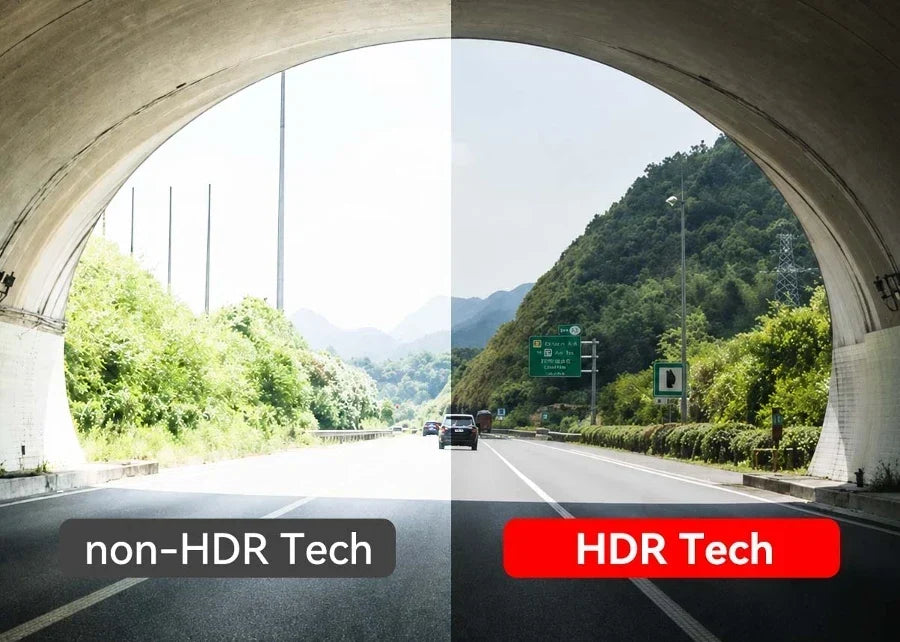
Many buyers keep asking, "What is HDR on dash cam footage?" before confirming their purchases. HDR keeps your video watchable when the lighting on the road goes from pitch black to blinding in a split second. Think of driving out of a dark parking garage into afternoon sun, or getting flashed by an oncoming driver's high beams at night.
No HDR means a dash cam blows out the bright parts into white glare or lets the dark parts sink into black mush. Either way, you lose the details that actually matter. This guide breaks down how HDR works, how it differs from WDR, and what separates HDR from the marketing version, helping you pick a dash cam that can deliver.
What Is HDR on Dash Cam? A Simple Definition
HDR stands for High Dynamic Range. It is the process that lets the camera capture and display details across a much wider range of brightness levels, ranging from deep shadow to bright sunlight in the same frame. The difference is more like the difference between what your eyes can see and what a basic camera sensor can capture.
Your eyes adjust instantly and constantly. You can look at a shaded doorway and a sunlit street simultaneously without losing details. A standard dash cam sensor can't do that in a single shot; it has to pick one exposure setting. HDR lets the cam represent both extremes clearly in the same footage.
How Does HDR Work in a Dash Cam? The Multi-Exposure Process
Most dash cams achieve HDR through multi-exposure capture. Tech Radar's take is that it requires several images of the same moment at different brightness levels. Then, blending them will deliver one balanced frame. It happens dozens of times per second, so the final video plays smoothly instead of looking like a slideshow.
The Multi-Exposure Method
The cam records one frame at a shorter, darker exposure to preserve bright highlights. Meanwhile, another frame records at a longer, brighter exposure to pull detail out of the shadows. The processing chip merges the two (or more) frames into a single image.
It keeps the highlight detail from the dark exposure and the shadow detail from the bright one. And you'll have a frame with far more usable detail than either exposure could capture on its own.
The Role of Advanced Sensors
Newer image sensors, like the STARVIS 2 (used in Redtiger dash cams), can capture a wider range of light in a single pass. It reduces the processing lag between exposures, which is when motion artifacts tend to creep in. A wide-dynamic-range sensor gives HDR a better starting point before blending.
Multi-Exposure Trade-Offs
One thing is clear: HDR blends two or more images capture a fraction of a second apart. So, fast-moving objects can occasionally show slight ghosting or blur at the edges, especially at highway speeds.
It isn't a flaw; it's a physical limitation of combining frames captured at different moments. Better sensors and faster processors reduce such an effect, but it's worth knowing before you judge a camera's motion performance.
HDR vs WDR: What's the Difference?
Neither technology is strictly "better". They solve overlapping problems in different ways, and the right pick depends on how and where you drive.
|
Factor |
HDR |
WDR |
|---|---|---|
|
Image Quality |
Richer detail across bright and dark areas |
Good, but less nuanced in extreme contrast |
|
Dynamic Range |
Wider — built from multiple full exposures |
Moderate — adjusted from a single exposure |
|
Motion Handling |
Can show slight ghosting at high speed |
Handles fast motion more smoothly |
|
Hardware Requirements |
Needs a capable sensor and processor |
Works with more modest hardware |
|
Best Use Cases |
Low-light city driving, tunnels, glare-heavy scenes |
Highway driving, fast-changing light |
HDR blends multiple full exposures of the same scene for the richest, most balanced detail. In contrast, WDR (Wide Dynamic Range) adjusts brightness levels within a single captured image using software. Learn more about WDR dash cam vs HDR dash cam to understand the differences and choose the right option for your needs.
What Are the Benefits of HDR on a Dash Cam?
Better Low-Light Visibility
HDR pulls detail out of dim interiors and shaded areas that would otherwise disappear into black. It's quite important during dusk or under an overpass.
Reduced Glare in Steady, Color-Rich Nighttime Scenes
Oncoming headlights and streetlights stop turning into blown-out white blobs. Therefore, the road and any nearby hazards stay visible around the dash cams.
Improved Shadow Detail
You may come across objects tucked into the shade, such as a parked car or a cyclist near a building. They remain identifiable rather than vanishing into a dark blob.
More Accurate Colors
HDR blends real exposure data rather than brightening pixels (something like a conversion). Here, colors stay truer to life, avoiding a washed-out or oversaturated look.
More Legible Plate/Sign Details in Moderate-Light Conditions
Text on plates and signs stays sharp, avoiding glare or fading into shadow. And that's exactly the kind of evidence that matters after an incident.
Real-Life Scenarios Where HDR Makes a Huge Difference
Dawn and Dusk Driving
Low sun angles create some of the harshest lighting a camera will ever face. It presents a blinding sky in one part of the frame and a dark road in the other. HDR keeps both halves of that scene usable, rather than losing one to glare and the other to shadow.
Night Driving and Oncoming Headlights
A single bright headlight can wash out an entire frame on a standard camera, hiding everything around it. HDR keeps the headlight from overwhelming the shot. And it still preserves the darker surroundings, letting you see the vehicle behind the glare.
Rainy or Overcast Days
Flat, gray light sounds easy to film. However, wet roads reflect glare unpredictably while shadows under overpasses stay deep and dark. HDR balances that unevenness, preventing the footage from swinging between too bright and too dim from one moment to the next.
City Driving with LED Signs and Traffic Lights
LED signs, brake lights, and traffic signals are small. Comparatively dark streets also surround those intensely bright points. HDR keeps those bright points readable without letting them bloom into unreadable white flares that swallow details.
True HDR vs Fake HDR: How to Spot the Difference
Not every camera labeled "HDR" actually performs true multi-exposure blending. Some cheaper models apply basic software brightness adjustments and call it HDR.
What True HDR Actually Is
True HDR captures multiple real exposures of the same frame and merges the actual light data from each one. Thus, it preserves actual detail in both shadows and highlights without shifting the brightness values.
What "Fake" or "Enhanced" HDR Looks Like
Fake HDR usually takes a single exposure and applies a software filter or AI-based brightness boost. It looks better at first glance, but it isn't recovering detail that was never captured; it's just stretching the pixels.
How to Spot the Difference
Look for real-world sample footage, since fake HDR tends to fall apart in challenging lighting. Authentic brands name their sensor hardware, like Sony STARVIS 2 by Redtiger. They also describe a multi-exposure process, which generally indicates that they are upfront about how HDR works.
Why The Difference Matters
The whole point of a dash cam is having usable footage when something goes wrong. That's precisely when lighting tends to be at its worst (a sudden glare, a dark underpass, a rain-slicked night). Fake HDR is most likely to fail you in exactly the moment you need real detail the most.
What to Look for When Choosing an HDR Dash Cam in 2026
The Image Sensor Comes First
Check which sensor the camera uses. Sony's STARVIS 2 sensors, found in models like the Redtiger F17 Elite and F77, are designed for improved light sensitivity and dynamic range. They provide HDR processing with a stronger foundation to work from. Independent hands-on reviews back that up. One RivianForums owner review of the F17 Elite found that its front camera delivers video that's "exceptional" both day and night, adding that "you can read a stationary license plate even at night." Pocket-Lint's review of the F77 found that its dual STARVIS 2 setup "captures incredibly sharp footage from both the front and rear units, even at night," awarding the camera an Editor's Choice rating of 4.5/5.
Confirm It's True HDR
Look for language that describes multi-exposure capture rather than vague claims of "enhanced" or "AI-boosted" video. Product listings and spec sheets that name the sensor mark a good start. Possible dual or triple exposure blending descriptions are also a good sign that you're looking at genuine HDR.
Resolution Matters
HDR and resolution work together. A sharper base image gives HDR processing more detail to work with. Look for at least 4K on the front camera. Check on the rear as well if you want equally usable footage in both directions, as with the dual 4K setup on the Redtiger F77.
Aperture and Lens Quality
A wider aperture lets in more light before HDR processing even begins, which especially helps at night. Multi-layer glass lenses with a wide f-stop rating tend to outperform basic plastic lenses in low light. It doesn't matter how good the sensor's HDR algorithm is.
Frame Rate Considerations
HDR involves blending multiple exposures into a single frame. So, a camera needs enough processing headroom to do that at a smooth frame rate. That too should be done without dropping to a slideshow effect during fast motion. 30fps at your target resolution is a reasonable baseline for highway driving.
Check Real-World Samples
Before buying, watch actual unedited night and glare footage from an intended/target model. Dash cam forums + independent reviewers post real nighttime samples that show exactly how a camera's HDR performs under pressure.
- Confirm the sensor model first. STARVIS 2 sensors appear in cams like the Redtiger F17 Elite (dual STARVIS 2, IMX678 + IMX675) and the F77 (dual STARVIS 2 IMX678).
- Look for dash cams that explicitly describe dual or multi-channel HDR processing. You'll find such a description with the Redtiger ViewClear 70's dual-HDR front and rear setup.
- Prioritize 4K resolution on at least the front channel for the sharpest base image before HDR processing.
- Check for a wide-aperture lens (f/1.8 or better) to maximize light capture in low-light scenes.
- Read or watch independent night-driving reviews before purchasing, not just manufacturer marketing stills.
Conclusion
HDR earns its place among most drivers for its definite advantages in retained video quality. If you mostly drive fast-changing highway routes with smooth motion, a solid WDR camera might be enough. If you spend more time on low-light city streets, in tunnels, or on scenic routes with dramatic lighting shifts, true HDR is the clear upgrade.
For drivers looking for a more balanced solution, hybrid setups that combine advanced HDR processing with high-quality image sensors can offer the benefits of both technologies. Brands like Redtiger continue to develop dash cams with enhanced imaging capabilities to help capture clearer footage across a wider range of driving conditions. Ultimately, the key question is whether the HDR technology delivers real multi-exposure processing or is simply being used as a marketing label.


Frequently Asked Questions (FAQs)
1. Does HDR use more storage space?
Slightly, in some cases. HDR processing uses multiple exposures per frame so that video can have marginally larger file sizes. However, the difference is usually modest compared to the jump from 1080p to 4K.
2. Does HDR reduce video resolution or frame rate?
Not on a well-built camera. Quality HDR dash cams process the extra exposure data without dropping resolution or frame rate. But cheaper processors on lower-end cams can sometimes struggle to keep things smooth.
3. Is HDR better than WDR for night driving?
Generally, yes. It's true for capturing details in high-contrast night scenes. True HDR preserves more of the original exposure data than standard WDR. WDR can still perform well for smoother handling of rapidly changing light at high speed.
4. HDR vs 4K: which is more important?
They solve different problems. In that case, experts recommend both. Resolution determines how much fine detail the camera captures. Meanwhile, HDR determines how well that detail survives challenging lighting conditions.

Leave a comment
All comments are moderated before being published.
This site is protected by hCaptcha and the hCaptcha Privacy Policy and Terms of Service apply.