































Many vehicle owners remain perplexed when deciding between an OBD-II port and hardwiring for parking mode. It eventually comes down to one question: do you want quick and easy, or stable and permanent?
Both methods can power your dash cam while the car sits parked. However, they behave very differently once your engine shuts off. Pick the wrong one, and you could end up with a dead battery.
Or it could be a dash cam that never entered parking mode, or a cable dangling right where your foot goes. This guide compares the two options with details and walks you through installing a hardwire kit the right way.
What Is Dash Cam Parking Mode and Why Does It Need Continuous Power?
Dash cam parking mode keeps your camera watching your car even after you've turned off the engine and walked away. It may implement impact detection or time-lapse recording to catch anything that happens nearby.
The mode needs continuous power. It's because the moment your key turns off, most cars cut power to the accessory outlets. Most parking mode systems lean on two features working together.
A G-sensor detects sudden movements, like someone bumping your car in a parking lot. It also locks that clip so it can't be overwritten. Time-lapse recording captures frames at a slower rate to save storage while still documenting hours of activity.
Both features are useless without power. That's why drivers compare an OBD-II port or hardwire for parking mode as the two realistic ways to keep electricity flowing to the cam around the clock.
How Does Parking Mode Know When Your Car Is Parked?
Parking mode knows your car is parked because it can distinguish between the two power types. Constant battery power stays live all the time, whereas ignition-switched power only turns on when your key is in the accessory or run position.
When ignition power is lost, but battery power remains, the dash cam recognizes the engine has just shut off and automatically switches to parking mode. A proper three-wire hardwire kit connects to both circuits at once, plus a ground wire. Thus, it can read that ignition signal directly from your fuse box.
The moment the ACC (accessory) fuse goes dark while the BATT (constant power) fuse stays hot, the kit tells your camera to stop drawing full power. It further instructs the system to start conserving battery through motion or time-lapse recording.
OBD-II Port or Hardwire for Parking Mode: Key Differences
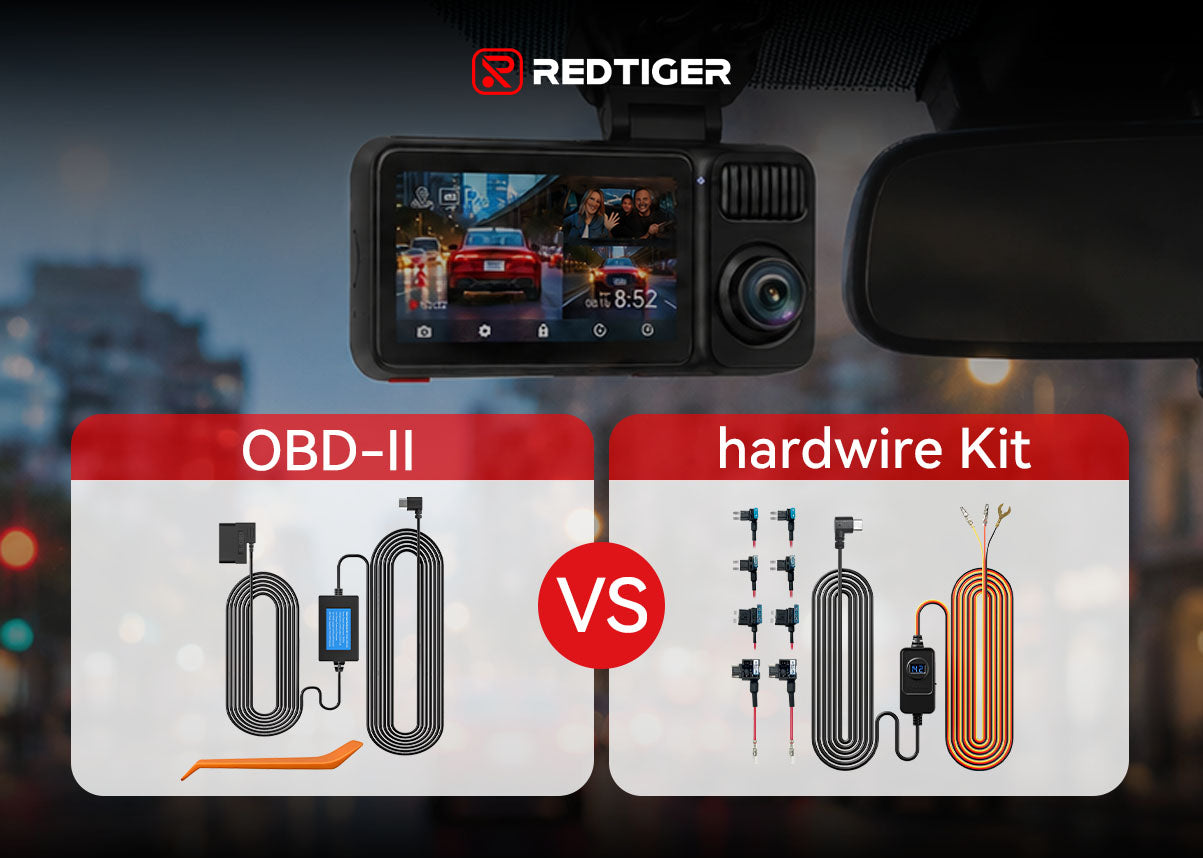
The core difference comes down to stability versus convenience for OBD-II port or hardwire for parking mode. An OBD-II adapter plugs in quickly but draws power from your car's diagnostic system, which is shared with the vehicle's other modules. A hardwire kit takes more effort to install but delivers dedicated, predictable power for parking mode.
|
Factor |
OBD-II Adapter |
Hardwire Kit |
|---|---|---|
|
Installation Difficulty |
Very easy (plugs in, no tools needed) |
Moderate (requires opening the fuse box panel) |
|
Parking Mode Compatibility |
Inconsistent (depends on vehicle and adapter) |
Reliable (built for this exact purpose) |
|
Power Stability |
Variable, shared with diagnostic bus traffic |
Stable, dedicated circuit |
|
Cable Management |
Cable often dangles near the pedals |
Hidden behind trim panels |
|
Battery Protection |
Built-in (typically 11.8V cutoff) |
Built-in (typically 11.8V cutoff) |
|
Vehicle Compatibility |
Nearly universal port, but behavior varies by make |
Universal with the right fuse-tap adapter |
|
Ease of Removal |
Instant (unplug and go) |
Takes a few minutes to disconnect |
|
Long-Term Reliability |
Can loosen with vibration over time |
Secure, permanent connection |
|
Overall Cost |
Usually cheaper upfront |
Slightly higher, but built for the job |
You may want something you can plug in this afternoon with zero tools. In that case, the OBD-II adapter wins on convenience. Some care about consistent parking mode and battery protection via a hidden cable. There, the hardwire kit performs better across all 24/7 monitoring standards.
OBD-II Adapter: The Plug-and-Play Shortcut
An OBD-II adapter is the fastest way to power a dash cam for parking mode. Plug the adapter into the diagnostic port under your dashboard and connect the cable to your camera. That's it, and you're done in under two minutes.
The OBD-II port on your car is technically reserved for diagnostic scan tools, not permanent power delivery. Furthermore, it's the same connector mechanics use to read your engine codes. Occupying it full-time can be inconvenient whenever you need a scan.
Battery protection on REDTIGER's OBD-II Hardwire Kit is built in. It cuts power to the dash cam when the vehicle battery drops to around 11.8V (±0.2V) — well above the engine-cranking threshold. Generic or budget OBD-II adapters may not include this protection, so it's worth checking the spec sheet before buying. Low-quality adapters can also keep certain vehicle control modules from fully powering down.
Hardwire Kit: The Gold Standard for Parking Mode
A hardwire kit remains the preferred long-term solution for dash cam parking mode. It connects directly to your fuse box instead of sharing a diagnostic port. Thus, your camera will have a dedicated, purpose-built power path with real battery protection.
Stable Continuous Power
A hardwire kit taps a dedicated fuse slot rather than sharing the OBD-II bus. Thus, your dash cam gets clean, consistent voltage without competing with diagnostic traffic or other devices plugged in.
True Ignition Detection
A three-wire hardwire kit reads the ACC and BATT circuits directly from the fuse box. And it delivers an accurate, near-instant read on whether the ignition is on or off without secondhand interference.
Hidden Cable Routing
Hardwire kits route their cable behind trim panels and along the headliner. Therefore, nothing dangles near your pedals or across the dashboard, as an OBD-II cable often does.
Reliable Parking Mode Activation
The ignition signal is read directly, rather than via a shared bus. It enables hardwired dash cams to enter and exit parking mode faster and more consistently.
Better Compatibility Across Most Vehicles
A hardwire kit works with almost any 12V or 24V vehicle with a standard fuse box. Many multi-size fuse adapters make it straightforward to find a compatible slot regardless of make or model.
The REDTIGER hardwire kit accepts 12V to 24V input and includes four fuse adapter sizes. It comes with a hidden-wiring installation tool and an 11.5-foot cable to reach windshields in most sedans, SUVs, and trucks.
Hardwire Kit or OBD-II: Which Parking Mode Power Method Should You Choose?
Choose based on how you actually use your car and how much you value convenience versus long-term battery safety. Neither option is wrong, but one will fit your situation noticeably better than the other.
Choose the OBD-II Cable When You –
- Want the simplest possible setup and don't mind a visible cable near the dash.
- Need parking mode occasionally, like on road trips, rather than every single night.
- Not into opening a fuse box panel or want to avoid any tool-based installation.
- Frequently move the dash cam between cars, looking for easy plugging and unplugging.
Choose the Fuse Box Hardwire Kit When You –
- Want reliable 24/7 parking monitoring every time your car is parked, not just sometimes.
- Need to protect your car battery from deep discharge, not just a simple five-minute install.
- Want a clean, hidden cable setup with nothing visible near your pedals or dashboard.
- Plan to keep the dash cam in the same vehicle long-term rather than swapping it around.
Step-by-Step: How to Hardwire Your Dash Cam for Parking Mode
Installing a hardwire kit takes most drivers 30 to 60 minutes. However, it follows the same basic sequence in nearly every vehicle.
- Locate your fuse box, usually under the dashboard on the driver's side or inside the glove compartment.
- Use your owner's manual or the fuse box diagram to find an ACC (ignition-switched) fuse slot and a constant-power (BATT) fuse slot.
- Test each candidate fuse slot with a circuit tester or multimeter. The ACC slot should only show power with the key on, while the BATT slot should show power at all times.
- Remove the original fuses and insert the hardwire kit's fuse-tap adapters in their place. Each wire should be connected to the correct circuit.
- Connect the ground wire to an unpainted metal bolt or grounding point in the vehicle's frame.
- Route the power cable along the A-pillar and headliner trim to your dash cam's mounting position. Tuck the routed cable behind panels as you go.
- Plug the cable into your dash cam. If your kit has an adjustable cutoff, set the low-voltage threshold to the manufacturer's recommended level.
- Start the car to confirm whether the dash cam powers on normally. Then, turn off the ignition and verify it switches into parking mode within a few seconds.
In total, it seems more about finding the fuse box, identifying the right fuses, connecting the kit, and routing the cable. However, always check the voltage cutoff before closing everything up.
Conclusion
It's not very difficult to decide between an OBD-II port and hardwiring for parking mode. The OBD-II adapter wins on speed and simplicity. Whereas the hardwire kit wins on stability and long-term reliability. Casual users who only need parking mode occasionally can get by with a plug-and-play adapter.
For drivers who want dependable 24/7 parking protection, REDTIGER offers both cable options designed specifically for REDTIGER dash cams. Both options include battery protection to help prevent vehicle battery drain while maintaining continuous monitoring when needed. Whether you prefer the simplicity of an OBD-II connection or the more integrated setup of a hardwire installation, choosing the right cable ensures your dash cam is ready when you need it most.


Frequently Asked Questions (FAQs)
1. Does parking mode run all night?
Yes, as long as the power source and battery protection allow it. A properly installed hardwire kit with low-voltage protection can keep a dash cam in parking mode even for several days.
2. Does hardwiring drain the car battery?
A properly installed hardwire kit with a working low-voltage cutoff specifically prevents such an event. It continuously monitors your battery voltage and automatically cuts power when it drops to an unsafe level. Otherwise, extended use of parking mode can leave a battery too weak to start, one of the most common reasons drivers call for roadside assistance.
3. Is a hardwire kit worth it for 24/7 parking monitoring?
Yes, if you want reliable round-the-clock coverage. The stable power, accurate ignition detection, and built-in battery protection make a hardwire kit the more dependable choice for continuous monitoring. Occasional users who only need parking mode a few times may find an OBD-II adapter good enough.
4. Can every OBD-II port power a dash cam?
Nearly every vehicle sold in the USA since the 1996 model year has a standardized OBD-II port. It's because federal regulations require it for all light-duty vehicles. Having the port doesn't guarantee ideal results, though, since power delivery and how quickly the dash cam detects ignition changes can vary between vehicles and even between adapter brands.

Leave a comment
All comments are moderated before being published.
This site is protected by hCaptcha and the hCaptcha Privacy Policy and Terms of Service apply.