































You want a simple dash cam, one that you can stick on your windshield, plug in, and forget about. You don't want to wrestle with confusing menus, fuss over SD cards every week, or pull up a YouTube tutorial.
That's exactly what Redtiger promises to deliver. The brand's entire lineup revolves around one core idea: a simple-to-use dash cam that fits into your life without demanding your attention.
This guide walks through what simplicity actually looks like across key dimensions. We'll look into installation, operation, setup, and maintenance. Know why the best simple dash cam is the one you never have to think about.
How Simple Is It to Install a Redtiger Dash Cam?
Installing a Redtiger dash cam is a simple process (takes less than 20 minutes). Everything you need – mount, cable clips, trim tool, and electrostatic sticker comes in the box.
No need to visit a dealer or hire a technician unless you want parking mode, which requires hardwiring.
Most people overthink dash cam installation before they try it. In practice, Redtiger's mounting system and included accessories make the process feel more like hanging a picture frame.
What Comes in the Box and What Each Piece Does?
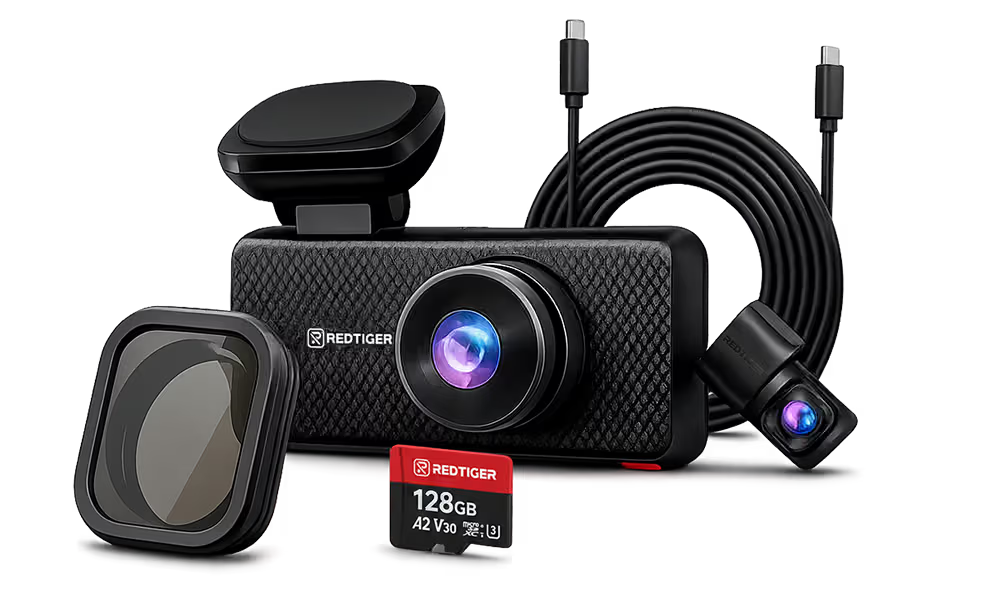
Redtiger designs its packaging so you can get started immediately. A standard F8 box includes –
- F8 4K dash cam with 3.18" touch screen, built-in GPS, and 5GHz WiFi. ("4K" refers to exported video files with a resolution of no less than 3084 x 2160)
- GPS windshield mount for secure placement.
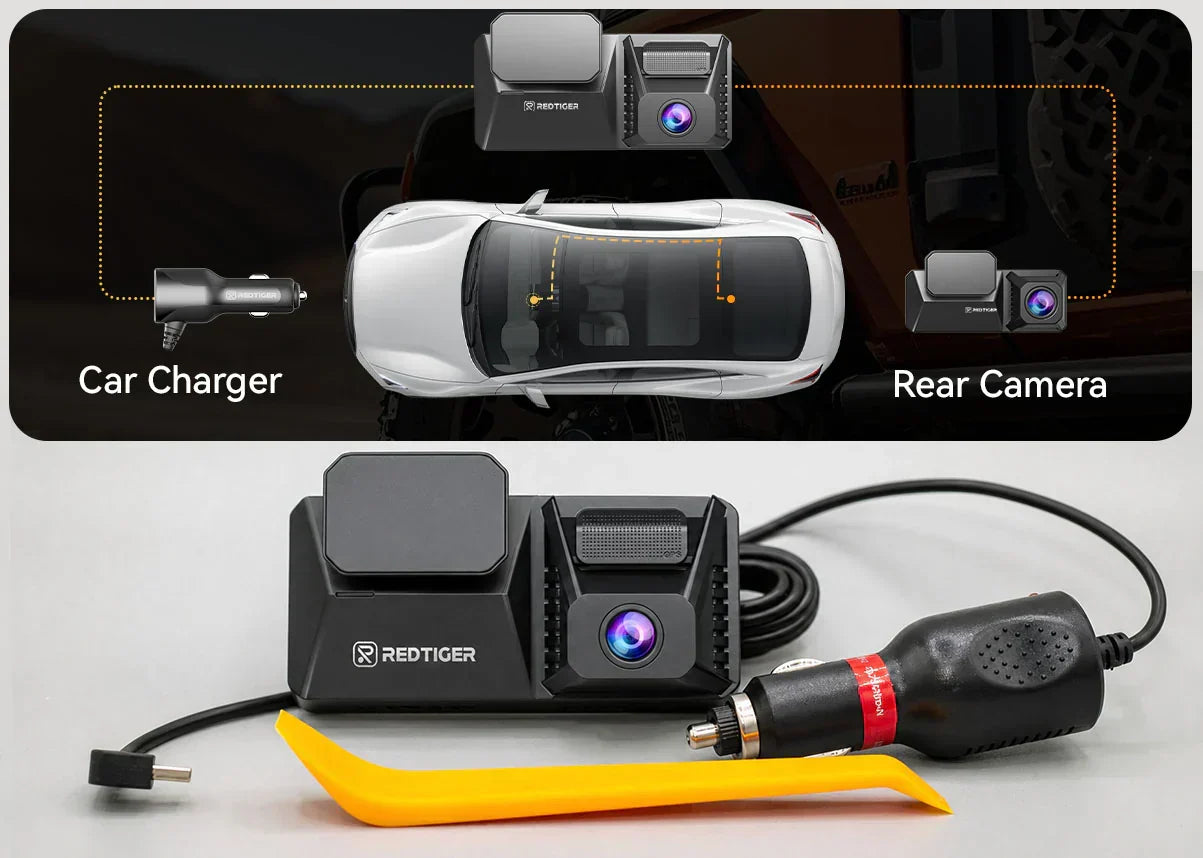
- Type-C car charger with 11.5-foot cable for the cigarette lighter port.
- Electrostatic sticker and adhesive mount for windshield attachment.
- 32GB microSD card, pre-installed and ready to record.
- Cable clips and a plastic trim tool to tuck wires neatly into headliner gaps.
- Quick-start guide with a QR code linking to an installation tutorial video.
The F77 takes things a step further with built-in 128GB eMMC storage. So, you don't need to insert a memory card. Power it on, and it starts recording immediately.
The Installation Process: Three Stages, Zero Tools Required
Stage #01: Mount the Front Camera
Choose a spot behind the rearview mirror so the camera doesn't block your sightline. Peel the electrostatic sticker, press the mount firmly to the glass, and slide the camera unit onto it.
Stage #02: Run the Power Cable
Plug the car charger into your cigarette lighter port. Now route the cable along the front windshield edge, across the headliner, and down the A-pillar. Use the included trim tool to tuck the cable into the gap between the headliner and the pillar trim.
Stage #03: Install the Rear Camera
Run the 20-foot cable from the front unit across the headliner and down to the rear window. Mount the rear camera on the inside of the rear windshield using the adhesive pad. Tuck excess cable into the headliner and side trim.
How Simple Is It to Use a Redtiger Dash Cam Every Day?
Once installed, a Redtiger simple dash cam should disappear into the background. It powers on automatically when you start your car, starts recording, and manages its own storage.
The set-and-forget quality separates a genuinely simple-to-use dash cam from simple-to-install but difficult-to-manage ones. And Redtiger's automatic systems can handle the details.
Automatic Recording: Start the Car, Start Recording
The F8 and the F77 use loop recording. So, the camera continuously records in short clips – 1, 3, or 5 minutes. Storage filling overwrites the oldest footage by default.
The built-in G-sensor adds an important layer of protection. A sudden impact automatically locks the current clip against overwriting. That protected clip remains separate unless you delete it manually.
Voice Control and Touchscreen: Operate Without Looking Away
The Redtiger F77 takes simplicity of operation further with 12 voice commands. Say "Lock the video," "Take photo," or "Turn on Wi-Fi," and the camera responds.
The feature is a genuine safety improvement. Locking important footage or capturing a photo of a license plate takes zero attention away from the road.
The 4-inch touchscreen on the F77 makes menu navigation intuitive. The screen is large enough to read at a glance, and the layout is logical for most drivers.
How Simple Is the Initial Setup and App Connection?
Getting a Redtiger dash cam configured takes about five minutes. Most default settings work well right out of the box, and you only need to adjust a handful of options.
Redtiger doesn't require you to configure the camera through an app or a computer. The menu system on the camera itself covers everything.
First-Time Configuration: What to Set and What to Leave Alone?
Powering on a Redtiger dash cam for the first time will display a straightforward menu. You need to set the following –
- Date and Time: Set these correctly so your footage is timestamped accurately. It matters if you ever need to submit footage to insurance or law enforcement.
- Resolution: The F8 supports 4K front recording ("4K" refers to exported video files with a resolution of no less than 3084 x 2160). The F77 records dual 4K. Either default setting is appropriate for most drivers; leave it as-is unless storage is a concern.
- Loop Recording Duration: The default 3-minute clips work well. Shorter clips (1 minute) make it easier to find specific moments; longer clips (5 minutes) generate fewer files.
- G-Sensor Sensitivity: Set to medium for most driving conditions. High sensitivity can trigger false locks on rough roads; low sensitivity may miss minor impacts.
You can adjust everything else (GPS stamps, speed stamps, audio recording, date format) later. Most drivers never touch them.
Read more: Dash Cam Setup That Works
Connecting to the Redtiger App: Two Minutes to Your First Wi-Fi Session
The Redtiger app is available for iOS and Android. Download it from the App Store or Google Play. Follow the steps –
- Turn on Wi-Fi from the dash cam's settings menu (or long-press the Up button on the F8).
- The camera's Wi-Fi name and password appear on screen. The default password is 12345678.
- On your phone, connect to the dash cam's Wi-Fi network. Turn off any VPN or antivirus app if the connection doesn't establish on the first try.
- Open the Redtiger app to view footage, review GPS tracks, or adjust settings wirelessly.
The F77's 5.8GHz Wi-Fi 6 connection transfers 4K clips to your phone in about 30 seconds. Pulling footage for an insurance claim or sharing a scenic drive is quite quick.
How Simple Is It to Maintain a Redtiger Dash Cam Long-Term?
Redtiger dash cams are low-maintenance by default. The primary maintenance task is a monthly SD card format, which takes a single menu tap.
Long-term reliability is where a simple dash cam proves its value. And Redtiger's well-balanced approach addresses all ends of the ownership.
Why Redtiger Uses a Supercapacitor Instead of a Battery?
Most dash cams use a lithium-ion battery. It works fine in mild climates, but extreme temperatures degrade lithium-ion cells quickly. A camera left in a 140°F car can lose battery capacity within months.
Redtiger F8 and F77 use a supercapacitor. Supercapacitors handle a temperature range of -4°F to 158°F without losing performance. They don't even degrade with charging cycles the way batteries do.
The trade-off is that a supercapacitor holds less power than a battery. However, for a dash cam that's always plugged, that's not a limitation. It's a more durable design for the specific way a cam operates.
SD Card vs eMMC Storage: Which Is Easier to Maintain?
- F8 (SD card): The F8 uses a microSD card (Class 10, U3, 32GB–256GB). SD cards are accessible and easy to replace with periodic attention.
Redtiger recommends formatting the card once a month through the camera's settings menu. It should prevent file fragmentation and read errors.
- F77 (eMMC): The F77 uses built-in 128GB eMMC storage (256GB in the V2). eMMC is the same type of flash storage used in smartphones. It's significantly faster and more durable than SD cards, and it's not subject to the vibration-related failures that can affect card-based systems on rough roads.
There's no card to lose, no card to format, and no card to replace. The F77 still benefits from monthly eMMC formatting (same single-tap process). However, the storage itself is built to last the life of the camera.
Many drivers want the most genuinely hands-off storage experience. And the F77's eMMC design is the cleaner solution. The F8's SD card slot offers flexibility for drivers who occasionally pull the card.
Firmware Updates: How Redtiger Keeps Your Camera Up to Date?
Redtiger delivers firmware updates over the air through the app. The app prompts you when there's an update available. You tap "Upgrade Now," the app downloads the update package, and the camera installs it automatically.
You may prefer a computer-based update. Redtiger offers a GPS Player application for Mac and Windows that handles firmware updates and GPS track playback. Either method works; the app route is faster for most people.
Which Redtiger Model Is the Best Simple Dash Cam for You?
The best simple dash cam from Redtiger depends on how you define "simple" for your situation. If simplicity means low cost of entry and familiar SD card storage, the F8 is your answer.
If simplicity means never thinking about storage, managing footage hands-free with voice commands, and getting the fastest possible Wi-Fi, the F77 is the cleaner long-term choice.
Redtiger F8: Simple from Day One
The F8 is the right choice if you want –
- 4K front recording in a proven, reliable package. ("4K" refers to exported video files with a resolution of no less than 3084 x 2160)
- An included 32GB microSD card so you can start recording immediately.
- GPS-integrated mount that logs your route and speed without extras.
- A 3.18-inch IPS display for on-camera footage review.
- A wide operating temperature range of -4°F to 158°F with the supercapacitor.
- Standard 5GHz Wi-Fi for app connectivity and wireless footage review.
The F8 suits daily commuters, families, and anyone buying their first dash cam. It delivers a steadfast experience without a premium price tag.
Redtiger F77: Simple at Every Level, Advanced Under the Hood
The F77 is the right choice if you want –
- Dual 4K front and rear cameras with Sony STARVIS 2 IMX678 sensors for exceptional night vision.
- Built-in 128GB eMMC storage (256GB in V2) without memory card requirements.
- 12 voice commands for hands-free operation while driving.
- A 4-inch touchscreen that makes in-camera navigation feel more like a smartphone.
- 5.8GHz Wi-Fi-6 for fast footage transfers; a 4K clip downloads in 30 seconds.
- Built-in GPS for route, speed, and location logging embedded directly into video footage.
The F77 suits rideshare drivers, frequent travelers, and anyone who wants premium features. The voice control and eMMC storage in particular make it the most genuinely low-touch Redtiger model.
Conclusion
Simplicity in a dash cam isn't about having fewer buttons. It's about the entire ownership experience. And Redtiger gets your rights established across all four dimensions.
Installation is self-contained and tool-free. Operation is automatic, with voice control on the F77 making the rare in-drive interaction completely hands-free. Setup takes minutes with sensible defaults that require no adjustment.
A simple dash cam experience of the F8 or the F77 delivers protection on the road without demanding attention. That's what the best simple dash cam actually looks like.


Frequently Asked Questions (FAQs)
Do I need any experience to install a Redtiger dash cam?
No experience needed. Redtiger designs its cameras for self-installation, and every box includes a trim tool, cable clips, and a QR code linking to a video tutorial. There's no cutting, drilling, or electrical work. Parking mode via the hardwire kit is more involved.
Does a dash cam record continuously?
While driving, yes. Redtiger cameras start recording automatically when you turn on the ignition and stop when you turn it off. Loop recording ensures continuous coverage without running out of storage.
What's the difference between the F8 and the F77?
The F8 uses an SD card (included), records 4K front, and connects via 5GHz Wi-Fi. The F77 has built-in 128GB eMMC storage, records dual 4K video with Sony STARVIS 2 sensors, supports 12 voice commands, a 4-inch touchscreen, and 5.8GHz Wi-Fi-6. ("4K" refers to exported video files with a resolution of no less than 3084 x 2160)
How do I view my footage without pulling the memory card?
Turn on Wi-Fi from the camera's menu, connect your phone to the dash cam's network, and open the Redtiger app. You can browse, play, and download footage wirelessly. GPS tracks are also viewable in the app alongside a Google Maps route overlay.

Leave a comment
All comments are moderated before being published.
This site is protected by hCaptcha and the hCaptcha Privacy Policy and Terms of Service apply.