































Many drivers are looking for the best dash cam app to pair with their dash cams. You may want one simple thing: control your camera from your phone without a headache. Only the best dash cam app lets you connect over Wi-Fi, check the live view, review recordings, and save key clips in minutes.
A dash cam is only as handy as its app. So, choosing the best dash cam app matters. This guide covers five key areas: connectivity, interface, transfer, playback, and compatibility. We'll also walk through the REDTIGER CAM App, a strong pick for anyone hunting for the best dash cam app for daily driving.
What Makes a Dash Cam Mobile App the Best?
The best dash cams app connects fast, stays simple, and lets you find and save footage without fuss. It also gives you easy access to the camera's core functions.
If an app does these four jobs well, it should be your preferred dash cam app. So, use the quick checklist to compare the apps –
1.Does it connect in a few taps?
2.Can you find live view, files, and settings without help?
3.Can you download a clip to your phone in seconds?
4.Does it support your phone and your camera model?
Easy Wi-Fi Connection in the Best Dash Cam App
A dash cam's Wi-Fi creates a direct link between the camera and your phone. View live video, change settings, and browse or download footage. A good dash cam app makes it easy to connect to the camera in under a minute.
While your phone is joined to the camera's network, it has no internet access. A good app explains this clearly, so you are never confused. That small detail separates any average apps from the best dash cam apps.
Also, check the connection range yourself. REDTIGER lists an effective range of 3 to 5 meters for the F7N Pro. You need to stay near the camera. Once you are connected, focus on the screen layout next.
Simple Navigation in the Best Dash Cam App
A clean layout saves time, a hallmark of the best dash cam app. You want a home screen that lets you view live video, open files, and access settings. REDTIGER publishes short video tutorials for its home screen, registration, and login.
It shows how much it values a clear first-time flow. In short, the best dash cam app should never make you hunt for basic buttons. After navigation, let's look at your recorded clips.
Convenient Playback and Downloads in the Best Dash Cam App
The best dash cam app lets you review a clip right on your phone. Good download options let you save clips for later. It also keeps downloads simple. Once saved, you can watch a clip anywhere, even without a Wi-Fi link to the camera.
On the Redtiger Cam app, open the Playback tab, select a video, and tap Download. The clip lands in the Downloads tab at the bottom of the app. Tap Save on the clip to keep it on your phone — the download step only fills the app's own library. Then check what the app lets you control.
Reliable Access to Essential Camera Functions
Look for access to live view, file browsing, and camera settings. Some models also offer app-based firmware updates. A good dash cam app keeps all these tools within a few taps. Still, even the best dash cam app can't fix weak hardware, so pair it with a solid camera.
How Important Is Ease of Use When Choosing the Best Dash Cam App?
Ease of use is the first test for the best dash cam app, and the biggest factor for most drivers. You often need your footage in a stressful moment, like after a fender bender. A simple app helps you act quickly. That is why the best dash cam app feels effortless on day one.
Connecting to Your Camera Without Complicated Setup
Setup should take a few steps, not a manual. REDTIGER lists four steps: install the app, turn on the camera's Wi-Fi, join the camera's network on your phone, and tap Add Camera.
The app then lets you access and download clips. That short path is what you want from the best dash cam app.
Finding Clips Quickly in the Best Dash Cam App
Speed matters when you need one clip out of hours of footage. On REDTIGER cameras, the G-sensor can automatically save impact clips.
The app's File button then helps you locate them fast. Save the footage soon after an incident, because loop recording overwrites older files.
Accessing Camera Settings Through Your Smartphone
A phone screen is easier than tiny camera buttons, so a dash cam app lets you change recording settings from the couch.
Over Wi-Fi, you can change settings from your phone. Some REDTIGER models also have touchscreens. For example, the F17 Elite has a 3-inch display.
Making the Best Dash Cam App Friendly for First-Time Users
New users need plain language and clear steps. The dash cam app should teach as you go. REDTIGER offers a Help Center, a user manual, and a support email for setup questions.
It also lists a 24/7 support channel. Good support makes even the best dash cam app feel safe for first-time users.
How Does the REDTIGER CAM App Make Dash Cam Management Easier?
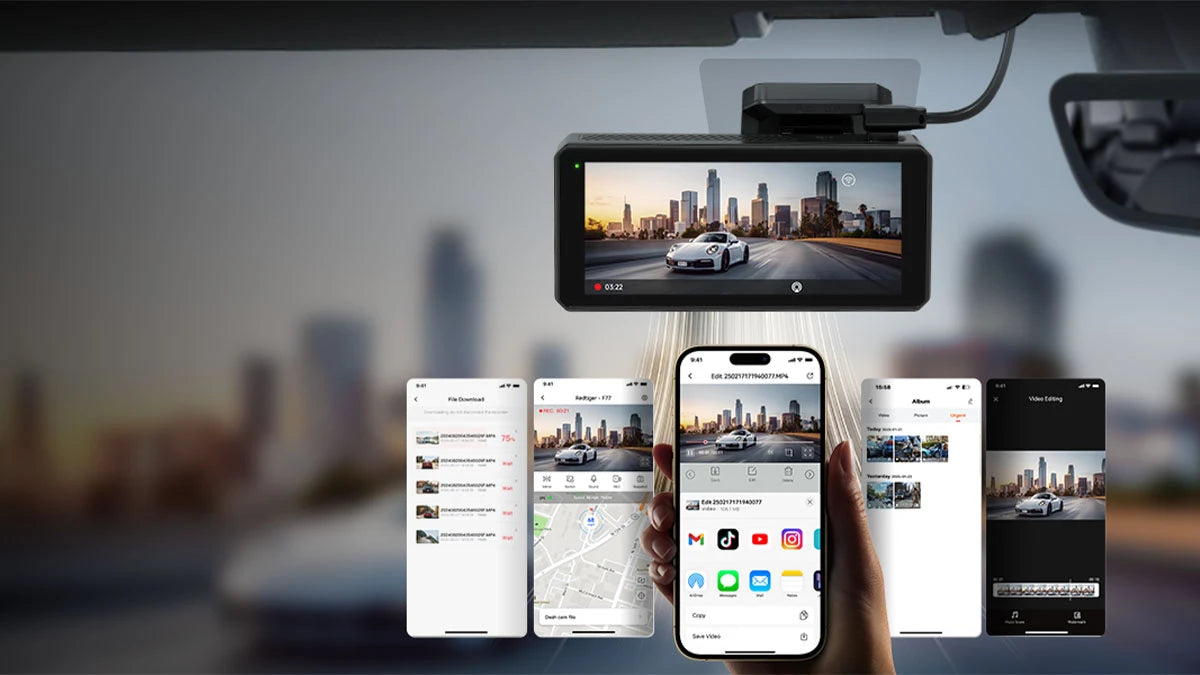
The REDTIGER CAM App, our pick for the best dash cam app guide, connects your phone to compatible dash cams over Wi-Fi. You can view live footage, browse recordings, and download clips.
REDTIGER also offers video tutorials for each step. That makes the brand a strong candidate for the best dash cam app if you want a simple routine.
Connect Compatible Dash Cams Through Wi-Fi
Connect by joining the camera's Wi-Fi network on your phone. Then you open the app and tap Add Camera. The F17 Elite uses 5.8GHz Wi-Fi 6, with a listed maximum of 30Mb/s.
Speeds differ by model, so check your camera's spec sheet. REDTIGER lists the F77 at 8 Mb/s and the View Clear 70 at 30 Mb/s.
View Live Footage Directly on Your Smartphone
On iPhone, open the app and tap Enter Camera to see live video. On the F17 series, you also get a live map. The best dash cam app should make aiming the camera easy.
It helps you check your angle after installing, without squinting at the camera screen. Keep in mind that this works over the camera's local Wi-Fi, so stay close. REDTIGER lists an effective range of 3 to 5 meters for the F7N Pro.
Browse and Download Recorded Videos
Open the file list, pick a clip, and download it. Long-press a file to download, delete, or share it, per REDTIGER's F9 manual.
You can also review footage on a computer with a card reader or the free REDTIGER Player. Use the app for quick saves and your computer for deep review.
Access Supported Camera Functions Through the App
The app also supports firmware updates on some models. The F17 Elite and View Clear 70 can update over the air through the app.
Updates require the latest app version and a Wi-Fi connection to the camera. One tip applies to all models. However, the latest app version must be used with the latest firmware.
Are REDTIGER Dash Cam Apps Compatible With iPhone and Android?
Yes. REDTIGER offers its app for both iPhone and Android through the official app stores. Compatibility, even for the best dash cam app, still depends on four things: your phone, your dash cam model, the app version, and the camera firmware.
Finding the Official App in the Relevant App Store
Search for "Redtiger Cam" in the Apple App Store or Google Play. You can also scan the QR code on the REDTIGER app page, or use the direct links there. Always download from official sources to avoid look-alike apps.
Checking Smartphone Operating System Requirements
Each store listing shows the minimum iOS or Android version it supports. REDTIGER doesn't list those versions, so check the store page before installing. The dash cam app should clearly list the phone systems it supports. Also grant the app the Wi-Fi permissions.
Confirming Compatibility with Your Dash Cam Model
Not every REDTIGER model has Wi-Fi. Meanwhile, the F7N series, F17, and F9 are covered by the Redtiger Cam app steps. The F3 and F5 are discontinued single-camera models, and the F5 is not compatible with the Redtiger Cam app.
|
Check
|
What to Confirm
|
|
Phone
|
Store listing shows the system requirements
|
|
Camera model
|
Your model has Wi-Fi and is covered in REDTIGER's app steps
|
|
App version
|
You run the latest version
|
|
Firmware
|
Camera firmware matches the app
|
Check your model before choosing the best dash cam app. Compatibility is the first filter. When in doubt, check your manual or ask support. The last piece is updates.
Keeping the App and Camera Firmware Updated
App updates and firmware updates are separate. App updates change the phone connection and interface, while firmware updates change how the camera runs. Keep both current, though: REDTIGER pairs the latest app version with the latest firmware, and some firmware files work only with the Redtiger Cam app.
Some firmware files work only with the Redtiger app. That is a good reason to treat the best dash cam app and your firmware as a pair. Always match firmware to your exact model. Keep both updated to get the best dash cam app experience.
How to Set Up and Troubleshoot Your REDTIGER Dash Cam App
Setting up a dash cam app takes four steps: download the app, turn on camera Wi-Fi, join the camera's network, and add the camera in the app. If something goes wrong, a few simple resets fix most issues.
Downloading the Official REDTIGER CAM App
Scan the QR code on REDTIGER's app page or search "Redtiger Cam" in your store. Install the latest version, since it pairs with the latest firmware. Follow these steps to get the best dash cam app running.
Enabling Wi-Fi on a Compatible Dash Cam
On F7N and F17 cameras, open Settings and turn on Wi-Fi. On F9, F5, and F3 models, Wi-Fi turns on automatically. On an F7N, you can also long-press the UP button. With Wi-Fi on, connect your phone to the camera.
Connecting Your Phone to the Camera's Wi-Fi Network
Open your phone's Wi-Fi settings and pick the network named after your camera. Enter the default password: 12345678. Then return to the app and tap Add Camera.
If you forget a changed password, restore the camera's defaults in settings on F7N and F17 models. The dash cam app may also need a reset sometimes.
Fixing Common Connection and Video Playback Issues
Some App Store reviewers report connection drops and slow downloads. These steps from REDTIGER usually help, whichever dash cam app you use –
Forget the camera's Wi-Fi in your phone settings, restart both devices, and reconnect.
- Turn off security software or VPN tools on your phone.
- Make sure only one phone is connected to the camera.
- Allow Wi-Fi permissions for the app.
- Update to the latest app version.
If playback still fails, check the firmware. REDTIGER suggests a firmware update when a video will not play. You can also email support.
Conclusion
The best dash cam app connects quickly, shows live footage, and saves clips without stress. The REDTIGER CAM App covers those basics through Wi-Fi, live view, and easy downloads on compatible cameras.
So, try the best dash cam app for your routine without hesitation. Visit the official REDTIGER CAM App page to download the app. Follow the setup steps to get the most out of your dash cam.
Frequently Asked Questions (FAQs)
Which dash cam has the best mobile app?
It depends on what you value. The best dash cam app connects easily, lets you play and download clips, and works with your phone. REDTIGER app covers live view, file browsing, and downloads on compatible models. Check reviews and your camera model before you decide.
Does REDTIGER have its own mobile app?
Yes. Its best dash cam app is Redtiger Cam, available on the Apple App Store or Google Play. The latest app version needs the latest camera firmware.
Can I download dash cam videos without removing the memory card?
Yes, the best dash cam app makes it easy. Connect your phone to the camera's Wi-Fi, open the app, choose a clip in Playback, and tap Download. The clip appears in the Downloads tab at the bottom of the app, and one more tap on Save stores it on your phone. You can also use a card reader if you prefer.
Do dash cam apps work on both iPhone and Android?
Most major dash cam apps support both, but the best app for you must match your phone. REDTIGER lists app links for the Apple App Store and Google Play, so the best dash cam app choice remains open. Compatibility also depends on your camera model and firmware.




Leave a comment
All comments are moderated before being published.
This site is protected by hCaptcha and the hCaptcha Privacy Policy and Terms of Service apply.