




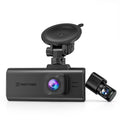

















Key takeaway: Understanding the relationship between your dash cam G-Sensor and parking mode is the difference between catching a hit-and-run driver on video and starring at an empty street. Standard settings often harbor hidden flaws—latency traps, memory locks, and phantom battery drain—that render your camera useless when you need it most.
Imagine this scenario: You walk out to your parked car in the morning and find a massive dent in the rear bumper. You confidently pull the memory card from your dash cam, expecting to see the culprit. Instead, the video shows a violently shaking camera, followed by the taillights of a car speeding away. You caught the aftermath, but not the impact.
This is the harsh reality for thousands of drivers relying on basic factory settings. Let's dive into the three critical "deep water" traps of dash cam parking mode and how to engineer your setup to guarantee flawless evidence.
Trap 1: The "Wake-Up Latency" Flaw
Most standard dash cams operate on a simple logic to save battery: they sleep until the physical G-Sensor feels an impact. Once shaken, the sensor triggers the Parking Mode to wake up the lens and start recording.
In standard "Auto-Event Detection," the process of waking from a deep sleep, powering the image sensor, and initializing the write sequence to the SD card takes approximately 3 to 5 seconds. If a vehicle backs into you and immediately drives off, that 5-second latency means your camera missed the actual collision entirely.
💡 The Engineering Fix: Buffered Parking Mode & Time-Lapse
To defeat latency, the camera cannot afford to sleep deeply. There are two professional solutions:
- Time-Lapse Recording: The camera records continuously at a low frame rate (e.g., 1fps). There is zero latency because the camera is never asleep.
- Buffered Recording (Advanced): Found in high-end systems, the camera's image sensor stays active, holding the last 15 seconds of video in temporary RAM. When the G-Sensor detects a crash, it writes that pre-crash buffer to the SD card. You see the car approaching, the impact, and the escape.
Trap 2: The "Locked File" Death Spiral
A dash cam utilizes Loop Recording, meaning when the SD card is full, it deletes the oldest normal driving footage to make room for new video. However, when the G-Sensor detects an impact, it permanently locks that specific file to protect it from being overwritten.
Many drivers, wanting maximum security, set their Parking G-Sensor sensitivity to the highest possible level. This creates a hidden disaster.
"If the G-Sensor is overly sensitive, closing a heavy car door, a loud thunderstorm, or a heavy truck driving past will trigger an 'Emergency Lock'. After a few weeks, your SD card is completely filled with thousands of false alarms."
When a real accident happens months later, the dash cam cannot record it because the memory is paralyzed by a "Card Full" error.
💡 The Engineering Fix: Smart Partitioning & Endurance Memory
First, calibrate your settings correctly: keep visual Motion Detection sensitivity low (to ignore rain/wind) but keep the Parking G-Sensor moderate-to-high. Second, never use a standard commercial SD card. Constant parking mode surveillance requires a High-Endurance Class 10 U3 SD Card designed specifically for continuous read/write cycles and extreme vehicle cabin temperatures.
Trap 3: Phantom Drain and the CAN-bus Conflict
The biggest hesitation regarding parking mode is a dead car battery. While basic articles suggest simply buying a hardwire kit, the reality of modern vehicle electrical architecture is much more complex.
Cheap, unbranded hardwire cables often pull a constant parasitic draw. Worse, poorly manufactured OBD-II power cables can prevent the vehicle's internal computer network (CAN-bus) from entering its natural sleep state. It isn't the dash cam draining your battery; it is the car's computer staying awake all night trying to communicate with a faulty cable.
💡 The Engineering Fix: Intelligent Low-Voltage Protection (LVP)
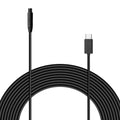
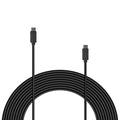
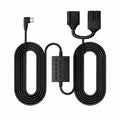
Protecting a $200 vehicle battery requires sophisticated power management. Utilizing an official Intelligent Hardwire Kit ensures clean circuitry that bypasses CAN-bus interference. More importantly, it features an adjustable Low-Voltage Protection (LVP) module. We strongly recommend setting the hardware cut-off switch to the highest conservative threshold (12.4V for standard 12V batteries). This guarantees the camera cuts its own power well before the battery loses its engine-cranking capacity.
The Ultimate Configuration Blueprint
Stop guessing with your settings. Use this empirical configuration to optimize the relationship between your G-Sensor and Parking Mode based on your environment:
| Primary Parking Environment | Recommended Parking Mode | Visual Motion Sensitivity | G-Sensor (Impact) Sensitivity | LVP Hardwire Setting |
|---|---|---|---|---|
| High-Traffic City Streets | Time-Lapse (1fps or 2fps) | Disabled (Records Continuously) | High | 12.2V - 12.4V |
| Quiet Suburbs / Driveway | Auto-Event (Buffered if available) | Low (Ignores leaves/rain) | Medium | 12.0V - 12.2V |
| Extreme Battery Anxiety | Auto-Event Detection | Low | High | 12.4V (Maximum Protection) |
A dash cam is an investment in objective truth. By understanding the mechanical reality of G-Sensor latency and memory management, and by integrating professional-grade hardwire and storage accessories, you transform your camera from a passive observer into an impenetrable security system.


Leave a comment
All comments are moderated before being published.
This site is protected by hCaptcha and the hCaptcha Privacy Policy and Terms of Service apply.