




























Does Dash Cam Drain EV Battery? What EV Owners Need to Know
|
|
Time to read 8 min

Help Center
Get help with setup, updates, and information

Track My Order
Check Your Package Tracking Status Online

Learn About Dash Cam
The Latest Dash Cam News and Information

Redtiger Player
Play the videos you've recorded on your PC

REDTIGER CAM APP
Download the Redtiger app and use it via a Wi-Fi connection
 Channel
 Sensor
 Video Resolution
 Display
 Lens Aperture
 HDR/WDR
 Wi-Fi
Wi-Fi
 Touch Screen Control
 Voice Control
 Parking Mode
 NiteGuard ™ Parking Mode
 Night vision capability
 GPS Logger
 G-sensor
 Loop Recording
 Storage
 CPL Supported
 Mounting Type (Default)
 Battery & Charging
 Working Temperature
We provide comprehensive pre-sales and after-sales service.

Redtiger offers free shipping on orders totaling $50 or more. We recommend purchasing shipping protection to safeguard your package and money.

Redtiger offers a 30-day money-back guarantee. You may contact us for a no-questions-asked return within 30 days of receiving your order.

Ordering a dashcam through the Redtiger official website entitles you to an additional 6-month extended warranty. This brings the total warranty period to 24 months.

Redtiger provides 24/7 customer service. You can contact us via email or call our customer service hotline directly.
No need to worry about after-sales service—we provide comprehensive after-sales support.
We offer free shipping on qualifying orders with no hidden fees or surprise charges.
Most orders are processed within 1–2 business days and shipped through trusted carriers to ensure safe and timely delivery.
You’ll receive tracking details as soon as your order ships, so you can follow it every step of the way.
From checkout to delivery, we make the process simple and worry-free.

Your satisfaction comes first. If you’re not completely happy with your purchase, you can request a return within 30 days of delivery.
Simply reach out to our support team and we’ll guide you through the process.
Once your item is received and inspected, your refund will be issued promptly according to our policy.
Shop with confidence knowing your purchase is protected.

We use industry-standard encryption and trusted payment providers to protect every transaction.
Your personal and payment information is securely processed and never stored or shared without authorization.
Multiple secure payment options are available for your convenience, so you can complete your purchase with total confidence.

Have a question? We’re here to help.
Our dedicated customer support team responds quickly and provides clear, helpful solutions — whether it’s product guidance, order updates, or after-sales support.
We’re committed to delivering a smooth experience before and after your purchase.
|
|
Time to read 8 min
One of the most common questions from EV owners is whether a dash cam drains the battery when parked. The short answer: yes, it can — but only if you set it up wrong. With the right installation, you can run parking mode worry-free.
Here's what actually happens when you plug a dash cam into an electric vehicle, and how to avoid ending up with a dead 12V battery.
Table of contents
When you plug a dash cam into an EV, it draws power from the 12V battery — the same small battery that runs your lights, infotainment screen, and door locks.
The tricky part is how that 12V battery gets recharged. Instead of an alternator, EVs use a DC-DC converter that pulls energy from the main high-voltage battery pack and feeds the 12V battery. The problem is that the converter only runs when the car is on or actively charging. Once you park and walk away, it shuts down completely.
So here's the bottom line: when your dash cam runs in parking mode on an EV, it's draining a battery that won't get topped off again until you start driving. That's why some EV owners come back to a car that won't start — not because the main battery is dead, but because the 12V battery quietly ran out of juice.
Yes, a dash cam in parking mode can drain your EV's 12V battery over time — but it won't touch the high-voltage traction pack.
Here's why it matters:
The problem isn't the camera itself — it's that the 12V battery doesn't get topped off while parked on many EV models.
Some newer EVs (like certain Teslas and Hyundais) will wake up periodically to run the DC-DC converter and recharge the 12V battery. Others — especially older models or entry-level EVs — do not.
The dash cam only pulls power from the 12V auxiliary system, not the main traction pack. The impact on your driving range is effectively zero.
The only scenario where the traction battery is involved: if your EV does have a smart 12V maintenance system that wakes the DC-DC converter, then the slightly increased load from the dash cam may cause the car to wake slightly more often — but the energy draw is negligible (equivalent to running a dome light).
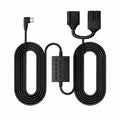
A low-voltage cutoff is the single most important feature for an EV dash cam installation. This is a circuit (usually built into hardwire kits) that monitors the 12V battery voltage and cuts power to the camera when it drops below a set threshold.
The cutoff device watches the voltage level every single second. You set a specific voltage on the device, such as 11.8V. The device turns off the camera power instantly when the level hits that exact number. You must select the correct number for your car to maximize this safety feature.
In real-world EV usage, voltage readings can fluctuate depending on vehicle sleep cycles, accessory load, and ambient temperature. For most EV owners using parking-mode dash cams, 11.8V–12.0V is generally considered the safest cutoff range.
Cutoff Voltage |
Approximate 12V Battery Reserve* |
Recommended Use |
12.0V |
~50% remaining |
Balanced protection for daily parking |
11.8V |
~30% remaining |
Longer parking duration in mild climates |
11.6V |
~20% remaining |
Aggressive setting; higher risk during cold weather or extended inactivity |
We can look at real-world cases to learn more. These true stories show exactly what happens with bad setups. You can use these examples to diagnose your own car troubles.
Many car owners connect their cameras without any safety cutoff. One forum user left their vehicle at the airport for three days. The constant camera draw emptied the small power source. Port adapters also cause significant issues for some drivers when they purchase cheap accessories from random online stores.
Some owners buy cheap adapters to connect under the dashboard. These low-quality adapters lack adjustable power limiters. The camera continues to pull energy even when the car sleeps. The accessory depletes the power below safe levels over time. Your daily drive habits also affect your power levels in significant ways.
Owners who take short trips often experience slow power depletion. A five-minute drive does not replenish the energy used previously. The continuous camera draw outpaces the brief recharge periods. You have three main methods to power your camera safely and avoid these exact problems in the future with your vehicle.
You must choose the right installation method for your car. The wrong choice leads to a dead battery and frustration. The right choice gives you peace of mind and constant protection. If you want a deeper breakdown of all available power options (including EV-specific considerations), you can also refer to this guide on how to power a dash cam.
Most EVs shut off USB and 12V ports after the vehicle enters sleep mode, so the dash cam stops drawing power automatically.
Best for:
Hardwiring enables parking mode, but EVs are often more complicated than gas cars. Some EVs:
Because of this, a hardwire setup that works in one EV may not work properly in another. If hardwiring an EV dash cam, use a voltage cutoff:
Best for:
Some EVs also support dash cam power through the OBD-II port, which provides a simple alternative to hardwiring. Instead of tapping into the fuse box, the dash cam connects directly to the vehicle's onboard diagnostics port and draws 12V power from it.
However, EV compatibility varies significantly:
Best for:
A separate battery pack powers the dash cam instead of the EV's 12V battery.
Best for:
Many false stories circulate online about electric cars and cameras. These myths cause unnecessary anxiety for new vehicle owners everywhere.
Reality: Some modern EVs do this (Tesla, Ioniq 5/6, EV6), many don't (older Leafs, early Bolts, some compliance EVs). Check your owner's manual — never assume.
Reality: The camera connects only to the 12V system. Zero measurable impact on range.
Reality: Under the Magnuson-Moss Warranty Act (U.S.), a dealer must prove the aftermarket part directly caused a specific failure to deny warranty coverage. A properly installed hardwire kit won't void your EV warranty.
Reality: False. The 12V battery powers the contactors and BMS that activate the high-voltage system. Dead 12V = car won't start, even with full traction battery.
You must take active steps to maintain your small power unit. Good habits extend the life of this important car component.
You should test your 12V battery periodically with a standard multimeter tool. This simple test reveals the actual health of your small power source. Healthy numbers sit at twelve point five volts or higher. You can also use modern technology to track health without opening the hood of your car.
You can connect a smart monitor directly to the main power terminals. This device sends real-time health data straight to your phone. You can watch the power levels drop and identify slow drains. Your travel routine plays a big part in health and requires careful attention from you every week.
You must evaluate your daily travel routine very carefully. Multiple consecutive days of short trips will deplete the small power unit slowly. You should take a longer drive once a week to replenish the energy levels completely. Manual control is sometimes the best option for you during very long trips.
You should turn off the camera manually when parked at home for extended periods. Your car rests safely inside your locked garage anyway. This manual shutoff prevents unnecessary power drain over long weekends.
Yes, a dash cam can drain an EV's 12V battery if parking mode is configured incorrectly — but with the right setup, it is usually not a problem. For most EV owners, the safest solution is a hardwire kit with a voltage cutoff set around 11.8V–12.0V, or an external battery pack for extended parking. Since EVs handle 12V battery management differently, always check how your specific model behaves while parked.
A properly installed dash cam provides reliable parking protection without noticeably affecting daily EV use. Many EV owners choose dash cams from REDTIGER because they support parking mode, voltage protection, and EV-friendly hardwire setups.
Explore Redtiger's 4K dash cam collection with parking mode support, or check our Tesla-specific dash cam options for seamless EV integration.
Yes. EVs use a DC-DC converter to charge the 12V system from the high-voltage battery, while gas cars use an alternator. EVs may enter sleep mode, during which 12V charging can pause depending on the model.
It can drain the 12V battery, not the main driving battery. Issues usually happen when the 12V system isn't recharged often during long parking periods.
Yes, if you want parking mode. Use a hardwire kit with low-voltage cutoff (around 11.8V–12.0V). For some EVs, OBD-II adapters or battery packs may be more stable.
No, not by default. Warranty is only affected if the device is proven to directly cause a specific failure.

