















Best Dash Cam with Voice Control for Safer, Hands-Free Driving
|
|
Time to read 7 min

Help Center
Get help with setup, updates, and information

Track My Order
Check Your Package Tracking Status Online

Learn About Dash Cam
The Latest Dash Cam News and Information

Redtiger Player
Play the videos you've recorded on your PC

REDTIGER CAM APP
Download the Redtiger app and use it via a Wi-Fi connection
 Channel
 Sensor
 Video Resolution
 Display
 Lens Aperture
 HDR/WDR
 Wi-Fi
Wi-Fi
 Touch Screen Control
 Voice Control
 Parking Mode
 NiteGuard ™ Parking Mode
 Night vision capability
 GPS Logger
 G-sensor
 Loop Recording
 Storage
 CPL Supported
 Mounting Type (Default)
 Battery & Charging
 Working Temperature
We provide comprehensive pre-sales and after-sales service.

Redtiger offers free shipping on orders totaling $50 or more. We recommend purchasing shipping protection to safeguard your package and money.

Redtiger offers a 30-day money-back guarantee. You may contact us for a no-questions-asked return within 30 days of receiving your order.

Ordering a dashcam through the Redtiger official website entitles you to an additional 6-month extended warranty. This brings the total warranty period to 24 months.

Redtiger provides 24/7 customer service. You can contact us via email or call our customer service hotline directly.
No need to worry about after-sales service—we provide comprehensive after-sales support.
We offer free shipping on qualifying orders with no hidden fees or surprise charges.
Most orders are processed within 1–2 business days and shipped through trusted carriers to ensure safe and timely delivery.
You’ll receive tracking details as soon as your order ships, so you can follow it every step of the way.
From checkout to delivery, we make the process simple and worry-free.

Your satisfaction comes first. If you’re not completely happy with your purchase, you can request a return within 30 days of delivery.
Simply reach out to our support team and we’ll guide you through the process.
Once your item is received and inspected, your refund will be issued promptly according to our policy.
Shop with confidence knowing your purchase is protected.

We use industry-standard encryption and trusted payment providers to protect every transaction.
Your personal and payment information is securely processed and never stored or shared without authorization.
Multiple secure payment options are available for your convenience, so you can complete your purchase with total confidence.

Have a question? We’re here to help.
Our dedicated customer support team responds quickly and provides clear, helpful solutions — whether it’s product guidance, order updates, or after-sales support.
We’re committed to delivering a smooth experience before and after your purchase.
|
|
Time to read 7 min
Choosing the best dash cam with voice control can make your driving much safer and easier. You no longer need to reach for buttons when something important happens on the road. Instead, you use your voice to control your camera. With a dash cam with voice control, you quickly record key moments without taking your hands off the steering wheel.
A voice control dash cam works in a unique way and gives you a straightforward way to manage your dash cam without needing to touch any buttons.
With voice control, you can tell your dash cam what you want it to do, using only your voice. If you want to save a video, start or stop a recording, or even take a quick picture, you do not need to lift a finger. This means your dash cam listens when you tell it to keep a video, snap a photo, or manage your recordings.
If you use a regular dash cam, you have to press buttons to save videos or change settings. This can take your mind off the road. With a voice-activated dash cam, you do not have to push buttons or look away from what matters. You just say your command out loud, and your camera responds right away.
You get many simple benefits with a dash cam that uses voice commands. This will make driving less stressful and keep your trips safer every time you head out.
You always want to keep both hands on the steering wheel for your own safety and for the safety of others. With a voice control dash cam, you do not have to reach out or press any buttons to use your camera. You can record videos, take photos, and protect recordings just by talking.
You have probably seen times when you want to have a nice view or a fun moment when you are out driving. With voice commands, your dash cam does the job for you right away, and you do not have to stop paying attention to the road.
If you ever have an accident or almost get into one, every second is important. Instead of looking for buttons, you can quickly tell your dash cam to save the video that is recording right now. With just your voice, you protect the important footage from getting lost or erased when you need it for evidence.
Trying to press small buttons while you drive pulls your attention away from the road and can be unsafe. With voice control, you do not have to do this at all. You just tell your dash cam what you want, and it obeys your words right away.
When you look for a dash cam with voice control, there are a few features that can make your camera much easier for you to use every day.
When you look at dash cams, you want one that understands your voice well. Good command accuracy means your dash cam follows what you say, even when cars drive by or music plays in your car. If your dash cam hears and understands you each time you speak, you will not get frustrated or have to repeat yourself.
You want your voice activated dash cam to do what you say right away. When you give a command, your dash cam should react fast and do as you ask. If there is any delay when you need your dash cam to record or save a video, it may cause problems—especially in sudden or important moments.
Your dash cam should know certain easy commands that fit your needs. You want it to react to basic requests such as "Start Recording," "Take Picture," or "Lock Video." These simple phrases let you control the main features without needing to do anything with your hands.
When you or someone in your family speaks another language, you want your dash cam to work for everyone. Multi-language support means you and your passengers can use your camera by talking in different languages.
A voice control dash cam can make a big difference in your daily driving. Here are some ways you might use it when you are out on the road.
When navigating a busy highway, you can say "Show Rear Camera" to instantly see what's happening behind your vehicle without taking your eyes off traffic. This helps you stay aware of surrounding vehicles and avoid potential hazards.
If you are on a road trip and the view is beautiful, you can simply say "Take Picture." There is no need for you to stop or search for a button. Your dash cam saves the memory at your command. This makes it easy to capture special sights and remember fun moments from your journey.
Sometimes, when you return to your parked car and notice damage, you may want to check your dash cam footage. With voice control, you can tell your dash cam to start recording or lock an important video right away. There's no hassle and you save time when trying to find out what happened.
During night driving, the dash cam screen might create glare on the windshield, making it harder to see the road. Using a voice command like "Take Off Display" dims or turns off the screen, keeping your focus on driving while the camera continues recording important footage.
Redtiger has several dash cam models that you might want to look at if you want easy voice controls and sharp video. Each one gives you something useful for your car.
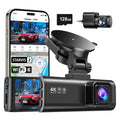
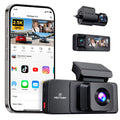
You will find the REDTIGER F17 Elite easy to use and strong in performance. This dash cam records in clear 4K so you see every detail, and it lets you use voice control for all main features.
Feature |
Detail |
Resolution |
4k + 2.5k + 1080p |
Voice Commands |
Lock Video, Take Photo, Turn On/Off Screen |
Connectivity |
Built-in Wi-Fi & GPS |
Display |
3.18-inch IPS Screen |
Night Vision |
Enhanced Super Night Vision |
If you want the best 4K video and easy voice features, this model gives you both without any extra steps.
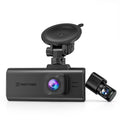
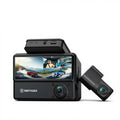
If you want a dash cam that gives you both front and rear views, the Redtiger F77 is a smart pick for your car. You get both cameras working together, so you see what happens in front and behind your car.
Feature |
Detail |
Resolution |
4K Front+4K Rear |
Voice Commands |
Start/Stop Recording, Lock Video, Take Photo |
Connectivity |
Wi-Fi & GPS Included |
Field of View |
170° Front, 170° Rear |
Parking Mode |
24-Hour Monitoring |
You need it for full front-and-rear surveillance managed with simple voice instructions.
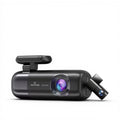
The NiteGuard™ Technology of Redtiger ViewClear-70 uses an ultra-sensitive backlit CMOS sensor with multi-frame long exposure and advanced noise reduction, delivering crystal-clear, full-color video even in near-total darkness.
Feature |
Detail |
Resolution |
4K+2.5K |
Voice Commands |
Lock Video, Show Rear Camera, Turn On/Off Audio |
Connectivity |
Built-in Wi-Fi & GPS |
Design |
Compact and Discreet |
Special Feature |
Hyper Night Clarity |
It is ideal for drivers who want exceptionally clear footage, even at night.
Voice control in dash cams makes driving easier, but there are some things you should know that could affect how well it works for you.
Your dash cam might not be able to hear your voice commands if you play music loudly, drive with the windows down, or talk to other people in your car. It can be hard for the dash cam's microphone to hear your voice over the sounds around you. Many new dash cams have noise filters to help, but if your car is very loud, your camera might not always be able to hear you clearly.
Dash cams with voice control work best when you use common speech patterns. The dash cam might not always hear your commands the first time if you have a strong accent. If you talk slowly and clearly, your dash cam will work better.
Where you put your dash cam makes a big difference in how well it hears your voice. You should mount the dash cam in the center of your windshield, so the microphone is not blocked by anything. The dash cam can better understand what you say and follow your commands when you talk to it.
A voice-controlled dash cam is like a helpful friend who rides with you and listens to what you say. You can use your voice to tell your camera to save videos, take pictures, or protect recordings. This means you can always see the road and drive safely. With a RedTiger dash cam featuring voice control, driving becomes safer, easier, and stress-free.
You can tell your dash cam what to do with your voice if it has voice control. You don’t have to press any buttons to start recording, save videos, or take pictures.
Yes, most dash cams that let you control them with your voice also record audio. Your dash cam with voice control can record both video and audio inside your car, but you can turn this feature off in the camera's settings.
Your dash cam with voice control has noise filters, but if there are loud sounds around you, it might still be hard for the camera to hear you. For the best results, speak clearly and directly.
You can use simple voice commands with a voice-activated dash cam, like "Lock Video," "Take Picture," "Start Recording," and "Turn On/Off Screen." Your voice-controlled dash cam may let you do other simple things as well.

