




























Dash Cam for Fleet Vehicles: What Does Your Business Need and Why?
|
|
Time to read 9 min

Help Center
Get help with setup, updates, and information

Track My Order
Check Your Package Tracking Status Online

Learn About Dash Cam
The Latest Dash Cam News and Information

Redtiger Player
Play the videos you've recorded on your PC

REDTIGER CAM APP
Download the Redtiger app and use it via a Wi-Fi connection
 Channel
 Sensor
 Video Resolution
 Display
 Lens Aperture
 HDR/WDR
 Wi-Fi
Wi-Fi
 Touch Screen Control
 Voice Control
 Parking Mode
 NiteGuard ™ Parking Mode
 Night vision capability
 GPS Logger
 G-sensor
 Loop Recording
 Storage
 CPL Supported
 Mounting Type (Default)
 Battery & Charging
 Working Temperature
We provide comprehensive pre-sales and after-sales service.

Redtiger offers free shipping on orders totaling $50 or more. We recommend purchasing shipping protection to safeguard your package and money.

Redtiger offers a 30-day money-back guarantee. You may contact us for a no-questions-asked return within 30 days of receiving your order.

Ordering a dashcam through the Redtiger official website entitles you to an additional 6-month extended warranty. This brings the total warranty period to 24 months.

Redtiger provides 24/7 customer service. You can contact us via email or call our customer service hotline directly.
No need to worry about after-sales service—we provide comprehensive after-sales support.
We offer free shipping on qualifying orders with no hidden fees or surprise charges.
Most orders are processed within 1–2 business days and shipped through trusted carriers to ensure safe and timely delivery.
You’ll receive tracking details as soon as your order ships, so you can follow it every step of the way.
From checkout to delivery, we make the process simple and worry-free.

Your satisfaction comes first. If you’re not completely happy with your purchase, you can request a return within 30 days of delivery.
Simply reach out to our support team and we’ll guide you through the process.
Once your item is received and inspected, your refund will be issued promptly according to our policy.
Shop with confidence knowing your purchase is protected.

We use industry-standard encryption and trusted payment providers to protect every transaction.
Your personal and payment information is securely processed and never stored or shared without authorization.
Multiple secure payment options are available for your convenience, so you can complete your purchase with total confidence.

Have a question? We’re here to help.
Our dedicated customer support team responds quickly and provides clear, helpful solutions — whether it’s product guidance, order updates, or after-sales support.
We’re committed to delivering a smooth experience before and after your purchase.
|
|
Time to read 9 min
One preventable collision can cost a small fleet operator $30,000 or more. Such an amount is due to repairs, liability claims, insurance rate hikes, and reduced vehicle availability. A dash cam for fleet vehicles not just records what happens.
It even changes driver behavior, protects the business during disputes, and provides visibility into operations they'd otherwise manage in the dark. You need to evaluate fleet dash cams, whether it's the first time or time for an upgrade.
This guide covers everything your business needs to know. We'll walk through the real ROI case, the specs that matter, and how Redtiger addresses common fleet camera needs: full coverage and remote monitoring from anywhere.
Table of contents
Are dash cams good/necessary for fleet vehicles? The answer from fleet operators who have deployed them consistently is yes.
Multiple insurance carriers in the US offer premium discounts for fleets equipped with dash cams. Fleets using fleet safety cameras experienced a 33% reduction in accident frequency (The American Transportation Research Institute).
It also showed a 52% reduction in accident severity compared to fleets without equipment. Those directly deliver lower premiums, fewer deductibles, and reduced exposure to catastrophic liability claims that can threaten a business's viability.
Staged accidents targeting commercial vehicles are disproportionately common. It's because the culprits assume that a commercial operator carries higher liability limits and will settle rather than fight. A commercial vehicle dash cam inverts that dynamic entirely. The driver's account is backed by video evidence from the front, rear, and sides, including the cam footage. And fraudulent claims collapse at the dispute stage without proceeding to settlement negotiations. A fleet dash cam system prevents a single bad-faith claim settlement.
Drivers who know their vehicle is equipped with a fleet camera system make careful choices. They increase following distances, reduce phone use, normalize speeds closer to posted limits, and minimize aggressive maneuvers.
This isn't speculation; it's a well-documented behavioral effect that fleet managers report consistently. The change isn't about surveillance for its own sake. It's about accountability. When a driver remains aware, the standard they hold themselves to while driving a company vehicle rises. Over a full year, that behavioral shift is the most durable safety improvement available from any single piece of equipment.
Consumer dash cams and fleet dash cams serve related but distinct purposes. Several factors separate a device that works for a commuter from one that works for a small-business operator.
A single front-facing camera records what happened ahead of the vehicle. For a fleet vehicle involved in a side-impact dispute, front-only footage may actually be worse than no footage at all.
A 4-channel fleet dash cam captures the front, left, right, and rear views simultaneously. It eliminates blind spots in the documentation record.
A full multi-channel coverage is the standard where side-angle incidents are frequent. It's particularly useful for delivery vehicles, vans, and trucks that operate in dense urban environments.
Video footage becomes significantly more useful as evidence when it carries embedded GPS data. It serves a second purpose beyond individual claim support. In fact, it provides route verification for delivery confirmation, overtime analysis, and regulatory compliance documentation.
Redtiger dash cams featured in the article include GPS tracking as a standard feature. The GPS log is present in every clip. And they're available for your review in the companion app. You can even export the footage in standard formats that insurance adjusters and legal teams can work with.
A consumer dash cam stores footage locally on a microSD card. Reviewing that footage requires physical access to the card or the camera. For a small fleet, that's not a practical workflow. A fleet dash cam with 4G LTE connectivity and cloud storage changes that entirely.
Managers can view footage remotely and receive alerts when specific events are triggered. They can see hard braking, sudden acceleration, a parking mode impact, and pull clips. That remote capability is what makes a commercial dash cam a high-end management tool.
Fleet vehicles barely go into a garage at the end of the day. They park outside, in direct sun in summer and in freezing temperatures in winter, day after day. A fleet camera system needs to handle the sustained environmental exposure.
Both Redtiger fleet-oriented cams can operate across a wide temperature range. In hot-climate states like Texas, Arizona, and Florida, or in cold-climate regions of the upper Midwest and Mountain West, temperature resilience becomes a practical spec.
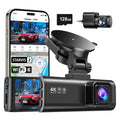
The 4-channel dash cam records front, left, right, and rear simultaneously. Such coverage means that no incident, regardless of direction, can occur without documentation. The front camera's dual Sony Starvis 2 sensor delivers 4K resolution with HDR in mixed lighting. "4K"refers to exported video files with a resolution of no less than 3840 × 2160. It matters for fleet vehicles operating at dawn and dusk.
License plates, traffic light colors, and road markings – everything remains clearly visible. Any query is resolved through the footage, turning it into evidence instead of a record.
The 5.8 GHz Wi-Fi connection allows fleet managers or drivers to pull footage directly from the camera. After an incident, a driver can connect to the cam's hotspot, review the relevant clip, and share it with dispatch or management.
The 5.8 GHz band transfers footage faster than the standard 2.4 GHz Wi-Fi. It's an important practical upgrade to pull a 4K clip from a 4-channel recording in a time-sensitive situation. "4K" refers to exported video files with a resolution of no less than 3840 × 2160.
Fleet vehicles spend significant time parked at customer sites, overnight at depots. The Redtiger VisionPano 40's parking mode activates on motion or vibration detection and captures footage.
Many delivery trucks and service vehicles remain parked in varied environments throughout the day. Hit-and-run, vandalism, and package theft at the vehicle get captured without going undocumented.
The VS10 uses 4G LTE connectivity to stream and upload footage in real time over the cellular network. A fleet manager can pull up a live view of any vehicle in the fleet from the phone or desktop.
Live view access is particularly valuable for fleet operators managing drivers remotely. A business owner can't directly observe as the VS10 closes visibility gaps without requiring a supervisor to ride along.
If the cam is stolen, damaged in a collision, or tampered with, the footage in the microSD goes with it. The Redtiger VS10 uploads event-triggered clips to cloud storage automatically over the cellular connection.
The footage exists independently of the physical device the moment the event occurs. It's a known tactic in fraudulent commercial vehicle claims, and cloud storage is the direct countermeasure.
The VS10's parking mode goes further than standard motion detection. It sends a real-time alert to the fleet manager's phone the moment it detects movement or impact while the vehicle is parked.
The manager sees what triggered the alert within seconds of it happening. For fleet vehicles parked at high-traffic locations, immediate notification means hit-and-run incidents can be reported promptly.
Feature |
VisionPano 40 |
VS10 |
Channels |
4 (front, left, right, rear) |
2 (front and rear) |
Resolution |
4K front, dual Sony Starvis 2 |
2.5K front, 1080p rear |
Connectivity |
5.8 GHz Wi-Fi |
4G LTE + cloud storage |
Remote Monitoring |
App-based, local footage review |
Live view via 4G LTE from anywhere |
Cloud Storage |
No (local microSD) |
Yes (footage uploads automatically) |
Parking Mode |
Yes (Time-Lapse Recording + G-Sensor) |
Yes (wireless alarm + cloud alert) |
GPS Tracking |
Yes (embedded) |
Yes (embedded) |
Best Fleet Use |
Multi-vehicle coverage, vans, delivery trucks |
Remote fleet management, mobile assets |
"4K" refers to exported video files with resolution of no less than 3840 × 2160.
The choice between the two comes down to a simple question. Ask yourself – does your business need remote monitoring from anywhere, or does it need complete multi-angle coverage at the vehicle?
The VS10 answers the first need. The VisionPano 40 answers the second. For fleet operators and commercial drivers looking to compare more heavy-duty options, you can also read our guide on the best dash cam for semi trucks.
Choosing the right camera is step one. Deploying it effectively across a fleet requires addressing a few practical considerations.
Some drivers understand that the cameras protect them and the business. That video also exonerates a driver who is genuinely not at fault. They adopt the program more readily and positively.
Frame the deployment as a protection tool first, not a monitoring tool. A fleet dash cam that protects their record as well as the company's is an easier sell than one positioned as oversight.
Local microSD storage overwrites on a loop after 24 to 72 hours, depending on resolution and card size. If an incident isn't flagged before that, the footage may be gone. Consider establishing a policy requiring drivers to report any incident, even minor ones, within 24 hours.
For cloud-connected cams like the VS10, event-triggered clips upload automatically for storage. It removes the dependency on human reporting for event clips.
Before installing fleet dash cams, notify your commercial auto insurer. Many carriers will adjust premiums immediately upon installation or verification of a fleet camera system. After a claim, proactively share dash cam footage with the adjuster. Adjusters who receive footage early resolve claims faster and are less likely to default to a split-liability outcome that costs the business.
A quality dash cam for fleet vehicles protects your business from three sides. First, it reduces accident frequency by changing the driver's behavior. Thus, it protects you from fraudulent claims with objective video evidence while giving fleet managers visibility into operations.
Redtiger VisionPano 40 and VS10 address the two most common needs in fleet dash cam deployments. The former is the best dash cam for fleet vehicles regarding complete multi-angle documentation. The VS10 is the right answer for remote monitoring, cloud storage, and real-time alerts.
The best dash cam for fleet vehicles depends on your primary need. Redtiger VisionPano 40 is the strongest choice with 4-channel coverage. Redtiger VS10 seems the better option for remote fleet management.
Yes. Fleet dash cams reduce accident frequency, lower insurance premiums, protect against fraudulent claims, improve driver behavior, and give fleet managers operational visibility they can't get otherwise.
It depends on the camera. The VisionPano 40 stores footage locally on a microSD card (no subscription). But the VS10 uses 4G LTE for cloud storage + remote monitoring, which requires a cellular data plan.
For most commercial vehicles, a minimum of front and rear coverage is the baseline. In dense urban environments, a 4-channel fleet dash cam like the VisionPano 40 provides complete documentation.
Managers review footage by connecting to the VisionPano 40's 5.8 GHz Wi-Fi hotspot via the Redtiger app. With the VS10, footage remains available remotely from any device through the cloud platform.

