















2.4GHz vs 5GHz WiFi in Dash Cam: What's the Difference?
|
|
Time to read 7 min

Help Center
Get help with setup, updates, and information

Track My Order
Check Your Package Tracking Status Online

Learn About Dash Cam
The Latest Dash Cam News and Information

Redtiger Player
Play the videos you've recorded on your PC

REDTIGER CAM APP
Download the Redtiger app and use it via a Wi-Fi connection
 Channel
 Sensor
 Video Resolution
 Display
 Lens Aperture
 HDR/WDR
 Wi-Fi
Wi-Fi
 Touch Screen Control
 Voice Control
 Parking Mode
 NiteGuard ™ Parking Mode
 Night vision capability
 GPS Logger
 G-sensor
 Loop Recording
 Storage
 CPL Supported
 Mounting Type (Default)
 Battery & Charging
 Working Temperature
We provide comprehensive pre-sales and after-sales service.

Redtiger offers free shipping on orders totaling $50 or more. We recommend purchasing shipping protection to safeguard your package and money.

Redtiger offers a 30-day money-back guarantee. You may contact us for a no-questions-asked return within 30 days of receiving your order.

Ordering a dashcam through the Redtiger official website entitles you to an additional 6-month extended warranty. This brings the total warranty period to 24 months.

Redtiger provides 24/7 customer service. You can contact us via email or call our customer service hotline directly.
No need to worry about after-sales service—we provide comprehensive after-sales support.
We offer free shipping on qualifying orders with no hidden fees or surprise charges.
Most orders are processed within 1–2 business days and shipped through trusted carriers to ensure safe and timely delivery.
You’ll receive tracking details as soon as your order ships, so you can follow it every step of the way.
From checkout to delivery, we make the process simple and worry-free.

Your satisfaction comes first. If you’re not completely happy with your purchase, you can request a return within 30 days of delivery.
Simply reach out to our support team and we’ll guide you through the process.
Once your item is received and inspected, your refund will be issued promptly according to our policy.
Shop with confidence knowing your purchase is protected.

We use industry-standard encryption and trusted payment providers to protect every transaction.
Your personal and payment information is securely processed and never stored or shared without authorization.
Multiple secure payment options are available for your convenience, so you can complete your purchase with total confidence.

Have a question? We’re here to help.
Our dedicated customer support team responds quickly and provides clear, helpful solutions — whether it’s product guidance, order updates, or after-sales support.
We’re committed to delivering a smooth experience before and after your purchase.
|
|
Time to read 7 min
You might think that your dash cam wifi works just like the router in your home. This is the biggest misconception many drivers have when they first buy a device for their car. Your dash cam wifi does not provide internet access to your car or let you browse the web while you drive. Instead, it creates a private and local connection between your phone and your camera. This connection allows you to view files and change settings without ever pulling the microSD card out.
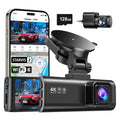
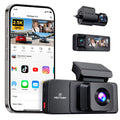
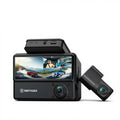
Many modern models, including REDTIGER dash cams with advanced 5.8GHz WiFi, take this experience further by offering faster and more stable file transfers between your device and smartphone. Understanding the difference between 2.4GHz vs 5GHz wifi in dash cam models will change how you use your device every day.
Does a dash cam need wifi to record your drives? The short answer is no, but it makes your life much easier. WiFi on a dash cam serves as a wireless bridge that connects your dash cam directly to a mobile app on your smartphone. This link lets you manage every part of your camera without needing a computer or a tiny screen.
When you install a new device in your car, you need to make sure it points at the right spot. Your dash cam uses WiFi to stream a live video feed directly to your phone screen. This helps you align the lens perfectly so you do not miss any important details on the road. You can see exactly what the sensor sees in real time to avoid a crooked or blocked view.
Most cameras have very small buttons that are hard to press while the device is mounted. You can use your dash cam wifi to open an app and change your preferences with just a few taps. This includes loop recording times, G-sensor sensitivity, and video resolution.
The most important use for WiFi is getting video clips off your dash cam when an accident happens. You can download a specific file to your phone as evidence to show the police or an insurance agent. This feature removes the need to carry a laptop or find a card reader on the side of the road.
The 2.4GHz frequency is the traditional standard that has been around for many years in the tech world. It is the same signal that older routers and many cordless phones use to send data through the air.
This frequency travels much farther than the 5GHz band. You can often stay connected to your dash cam even when you're several feet away from your car.
The waves at this frequency are better at passing through solid objects like seats or car doors. This makes the connection more reliable if you move around inside or outside your vehicle.
Almost every smartphone ever made can connect to a 2.4GHz signal without any issues. You will never have to worry if your older phone is compatible with your camera's WiFi.
The biggest downside is that this band offers a very low data rate. It takes a long time to move large files, which prevents you from getting the fastest dash cam video download.
So many devices use this frequency that it becomes very crowded and noisy. Bluetooth headsets and other electronics in your car can cause the connection to drop or lag frequently.
If you drive in a busy city, dozens of other signals will fight with your dash cam. This interference makes the app experience feel sluggish and sometimes very frustrating to use.
The 5GHz frequency is the modern and premium standard that you will find in top-tier devices today. It operates on a much higher frequency, which allows it to carry more data at once. When people look for the fastest dash cam video download, they are almost always looking for a 5GHz connection.
This band is significantly faster than the older 2.4GHz standard. You can download large video clips in a fraction of the time, which is perfect for 4K footage from your dash cam.
Very few household or car gadgets use the 5GHz band compared to the lower frequencies. This means you get a much cleaner signal with almost no interference from other nearby electronics.
Because the connection is so fast, the live video feed on your phone looks much smoother. You will notice less lag and better image quality when you check the view from your camera.
The higher frequency waves do not travel very far at all. You generally need to be sitting inside your car or very close to it to stay connected to your dash cam.
This signal struggles to pass through solid objects like thick metal or glass. If you step too far away from your vehicle, the connection will likely drop off very quickly.
Some devices might use a bit more power to maintain this high-speed link. While this is not a big deal for your car, it is something to keep in mind for older phones.
When you compare 2.4GHz vs 5GHz wifi in dash cam models, the winner depends on how you value your time. Both frequencies serve the same purpose, but they perform very differently under pressure.
The math behind video files shows why 5GHz is so much better for the modern driver. A 3-minute 4K video file is massive and requires a lot of bandwidth to move. On a 2.4GHz connection, that single clip might take three minutes or more to download to your phone. On a 5GHz connection, that same file usually moves in just a few seconds, giving you the fastest dash cam video download.
Urban traffic jams are filled with Bluetooth signals and other car WiFi networks that create a mess. These signals often interrupt the 2.4GHz band, which can cause your app to freeze or disconnect. The 5GHz band is much more stable because it operates in a less crowded space.
Almost all modern smartphones sold in the last several years fully support 5GHz WiFi signals. This makes the high-speed standard universally accessible for most people who buy a new device for their car. You should check your phone specs, but most users will have no trouble connecting to a 5GHz dash cam wifi.
As the industry moves from 1080p to 4K resolution, file sizes have started to quadruple in size. This change makes the dash cam wifi speed more important than ever before for every driver. A high-resolution video contains much more data, which means it needs a bigger "pipe" to move through.
4K files are very heavy and require a lot of bandwidth to transfer wirelessly. 5GHz provides the necessary speed to handle these files without making you wait for several minutes.
In an emergency, you do not want to stand around waiting for a progress bar. 5GHz ensures you get the footage you need immediately so you can resolve the situation quickly.
Higher speeds allow the app to load thumbnails and previews much faster than before. You can scroll through your library of videos without the annoying lag found on older 2.4GHz systems. Support for Dual Channels Many 4K cameras also have a rear-facing lens that records at the same time. Managing two streams of high-def video at once requires the extra power that only 5GHz can provide.
Choosing between 2.4GHz vs 5GHz WiFi in dash cam options comes down to your personal patience. If you do not mind waiting for a few minutes to see your videos, a standard 2.4GHz model will work fine. However, if you want the fastest dash cam video download, you should look for a device that offers 5GHz support.
REDTIGER offers a range of high-performance cameras that utilize advanced wireless technology, including 5.8GHz WiFi, enabling even faster and more stable file transfers compared to standard 2.4GHz systems. The Redtiger app is designed to be fast and easy to use, ensuring you never struggle with your files.
You should check out the latest models to see how a better connection can improve your driving experience. Invest in a higher-speed wireless system today to ensure you are always ready to capture and share every moment on the road.
Most phones will disconnect from cellular data when they join a dash cam wifi signal. You usually have to finish your download before you can browse the web or send messages.
Leaving the WiFi active on your camera uses a small amount of power from your car. It is usually best to turn it off when you are not using the app.
Your phone might be too far away from your dash cam to see the 5GHz signal. Try sitting closer to your camera or checking if your phone supports the higher frequency.
If you are still experiencing connection issues, you can read this troubleshooting guide here: dash cam not connecting to wi-fi.

